Is AI Colorization Accurate? We Tested It Against Real Colors
Partly. We turned 4 AI-made color photos grey, colorized them in 7 real edits and compared every result with the true colors: sky and skin held up, a jacket and a boat did not.
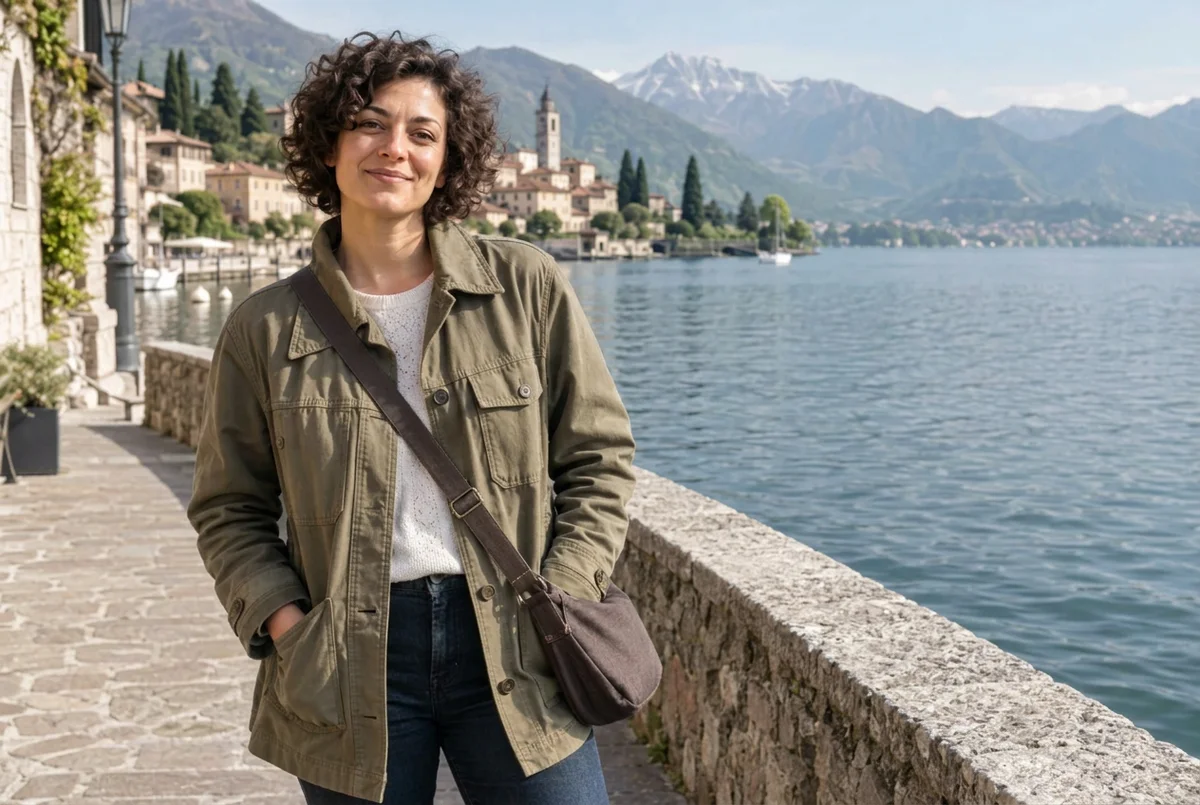
Is AI colorization accurate? Partly. In our test it got skies, water, skin, hair and stone right, but it turned a mustard jacket olive green, a red boat navy and added two pedestrians nobody photographed. A grey photo fits many colors, so the AI guesses: treat the colors as a plausible estimate, not a record.
Jump to the editor below these steps to colorize your own photo, or use our colorize black and white photos tool for a one-click version. PicOnTap is a browser-based AI image editor: upload a photo and describe the change in a sentence to remove objects, replace backgrounds, recolor details or restore old photos.
How we tested: on November 14 and 15, 2026 we took 4 AI-generated color photos with no real people, turned them grey ourselves, and ran 7 real edits in PicOnTap with Nano Banana 2.1 at 1K. Each edit cost 2 credits. One prompt ran twice by accident, which showed us how repeatable it is. Because we kept the color originals, we marked 5 to 9 areas on each photo in advance and compared their average color with the truth. A small sample, so read it as a pattern, not a verdict.
TL;DR
- Sky, water, skin, hair, stone and wood: right in every photo, usually within a hair of the original.
- Clothing and bags: guessed. A mustard jacket came back olive green and a blue denim bag came back brown, twice.
- Boats, felt and awnings: a red hull turned navy, a pale blue hull turned grey-white, a green awning turned red and a hydrangea turned blue.
- Muted or too vivid: the portrait and the harbor came back about 60 to 70 percent as colorful as the original, the market scene about 35 percent more.
- Things that were not there: two pedestrians appeared in the market street, and small white flowers came back bright yellow.
- The prompt barely mattered: the long prompt and the single word "colorize" gave the same colors, the same mistakes and the same score. Naming the colors in the prompt did change the result.
Is AI colorization accurate?
It is accurate for what the grey photo tells it, and it guesses the rest. A black-and-white photo records how bright each thing was, not what color it was. A red shirt and a dark yellow one can look identical in grey, so the model picks the color that is most common for that kind of object. Sky becomes blue and grass becomes green because they almost always are.
That is also why the failures look so natural. The guessed colors are plausible, so nothing in the picture looks wrong. People who studied older colorizers found the same thing: in a critical test of a colorization API, a writer turned color photos from 1909 to 1915 grey, colorized them and compared them with the originals; the results were dull tans and browns, and a painted railing lost its color. We ran the same kind of test with a current model, and the pattern was similar but subtler: plausible, a little faded, and wrong where the grey gives no clue.
How do I colorize a black and white photo with AI?
- Start with the clearest copy. Scan a print flat, or photograph it straight on in even light without glare. This is general advice; we did not test scans against phone photos.
- Upload it in the editor just below these steps. PNG, JPG and WebP files up to 10 MB work.
- Ask for natural colors and say what must stay. Tell the model to keep faces, shapes and text as they are. If you know a color, name it. Copy one of the prompts in the next section.
- Compare with your original. Look at clothing, signs, small objects and faces before you keep the result, and keep the unedited scan.
Every visitor gets a free daily allowance of 2 credits that resets at 00:00 UTC, with no sign-up and no watermark on the full-size download. A Nano Banana 2.1 edit at 1K cost 2 credits in our test, and the editor shows the cost before you submit. Jump to the editor below these steps and try it on one photo.
Which prompt should I use to colorize a photo?
These are the prompts we ran. Copy them as they are.
- Natural colors, nothing else changes: "Colorize this black-and-white photo with natural, realistic colors. Keep every face, shape, line and letter exactly as it is; only add color."
- One word: "colorize"
- With the colors you know: "Colorize this black-and-white photo of a felt toy robot. The head is light blue, the body is yellow, the buttons are red, the background is light gray. Keep everything else unchanged."
Does a one-word prompt work?
Yes, and it did exactly as well as the long one. We ran "colorize" on the same portrait and got the same olive jacket, the same brown bag and the same score as the long prompt. So the extra words did not buy accuracy; they protect faces and text, which stayed unchanged in all 7 results.
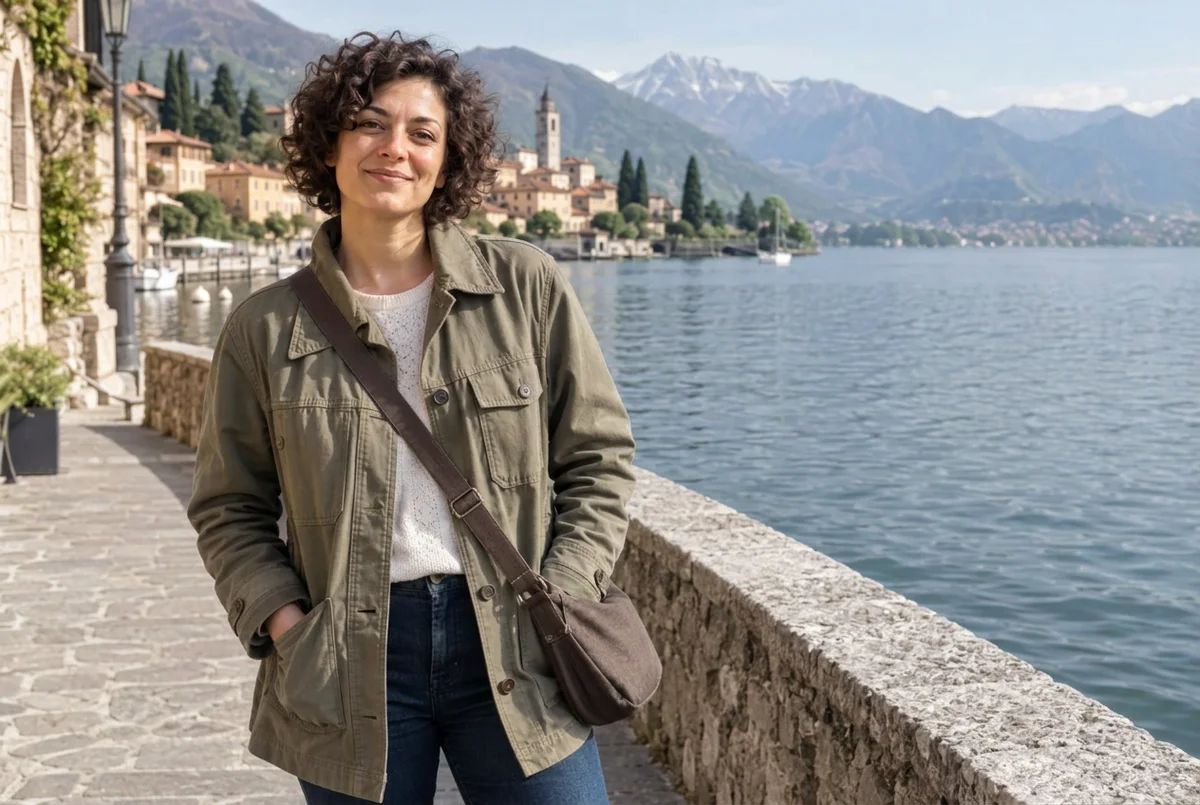 Result of the prompt 'colorize' on the same grey photo. Original: AI-generated, turned grey by us. Result: a real Nano Banana 2.1 edit in PicOnTap, November 14, 2026.
Can I tell the AI which colors to use?
Yes, for the parts you name. In the robot test, naming a blue head, a yellow body, red buttons and a light gray background gave a light blue head and red buttons, and a pale yellow body. The parts we did not name, the arms and boots, came back grey. Without the hint the same toy came out with a grey-blue head, a cream body and brown buttons.
What we found: 7 edits against the real colors
Here is the same scene three ways for the first photo: the color original, the grey copy we made, and the result.
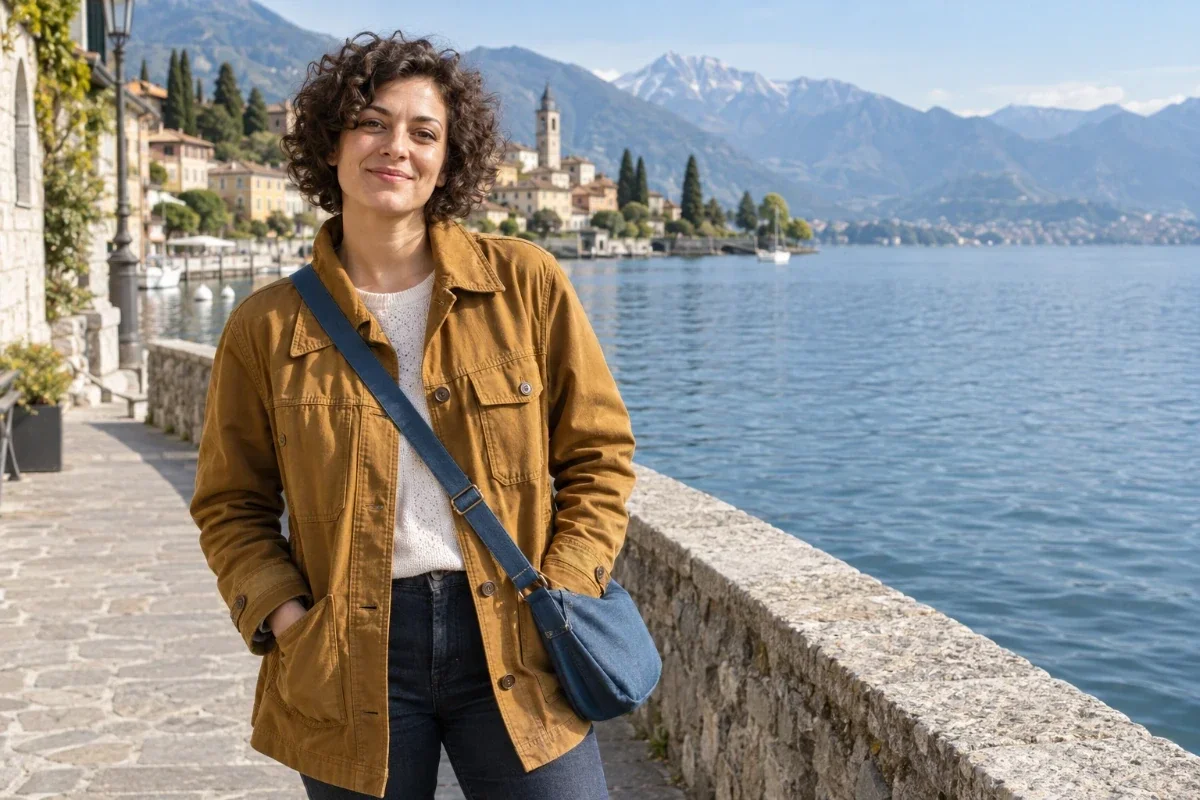 Original: AI-generated color photo, no real person.
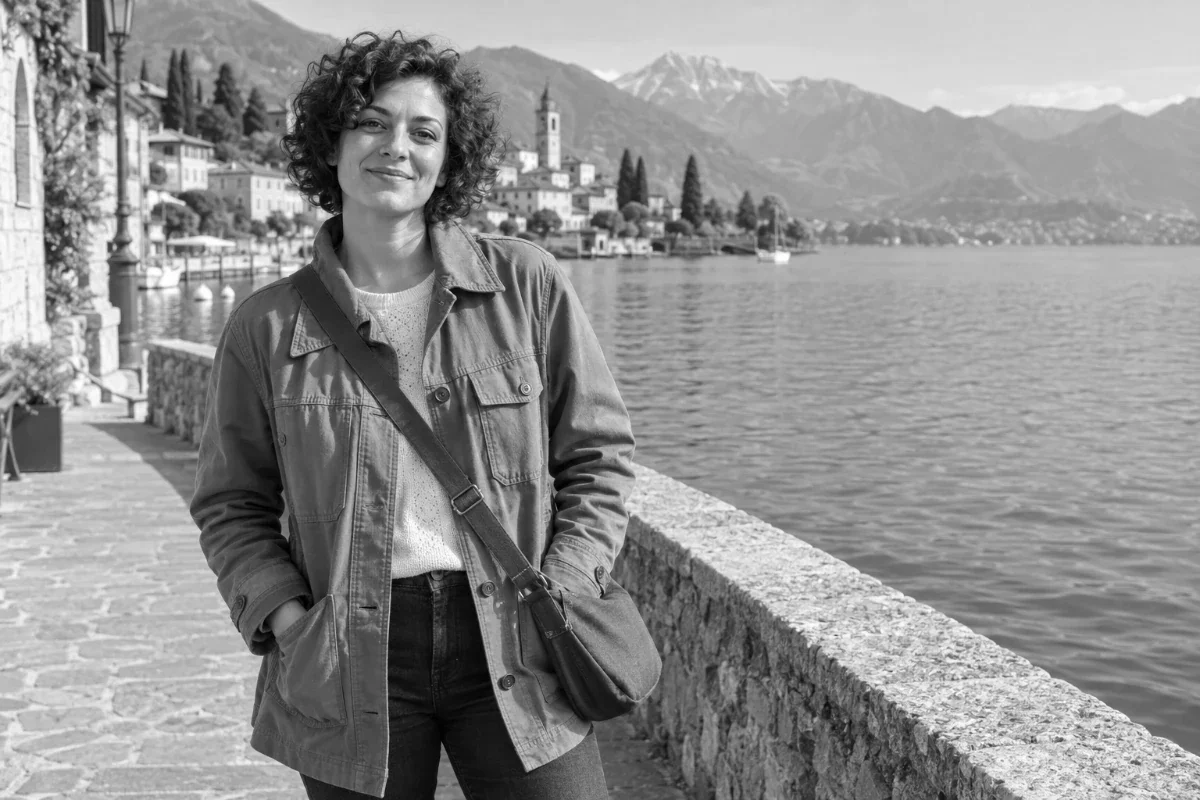 Grey input: the original turned grey by us, with no other change.
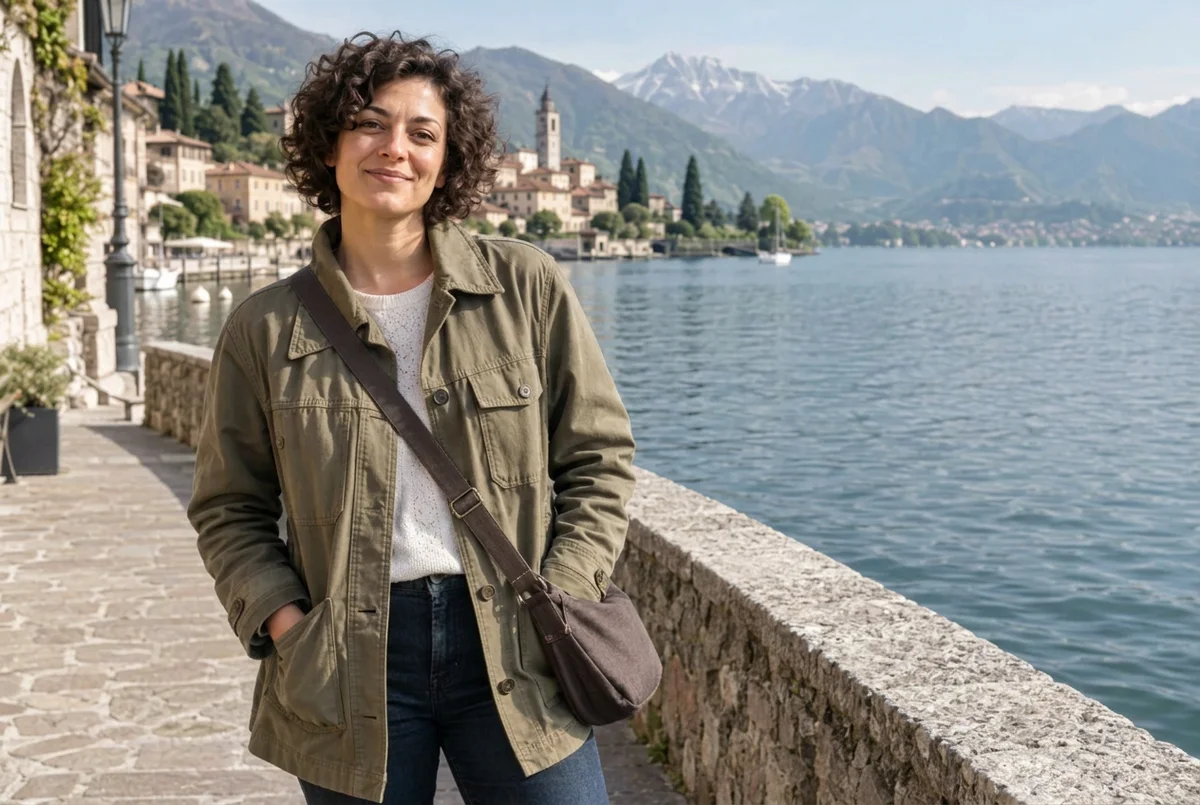 Result: a real Nano Banana 2.1 edit in PicOnTap, November 14, 2026, with the long prompt.
Which colors does AI get right?
Anything with a strong default. In the portrait, skin, hair, lake, sky and stone path landed within a hair of the original (a color distance of about 1 to 5 on a scale where 12 or less looks the same). Skin did not turn orange or muddy, which is the complaint people raise most often. The market scene kept its lavender, eucalyptus, wood and the writing on the chalkboard. The harbor kept its sky, pastel houses and stone quay. Text and faces did not change in any result.
Which colors does it get wrong?
Man-made objects where the grey gives no clue. The mustard jacket came back olive green and the blue denim bag came back brown, in both runs of the long prompt and in the one-word run. Our scoring called 7 of 8 marked areas right for that portrait, but one of our boxes sat on a shaded part of the jacket, so by eye the jacket is a miss.
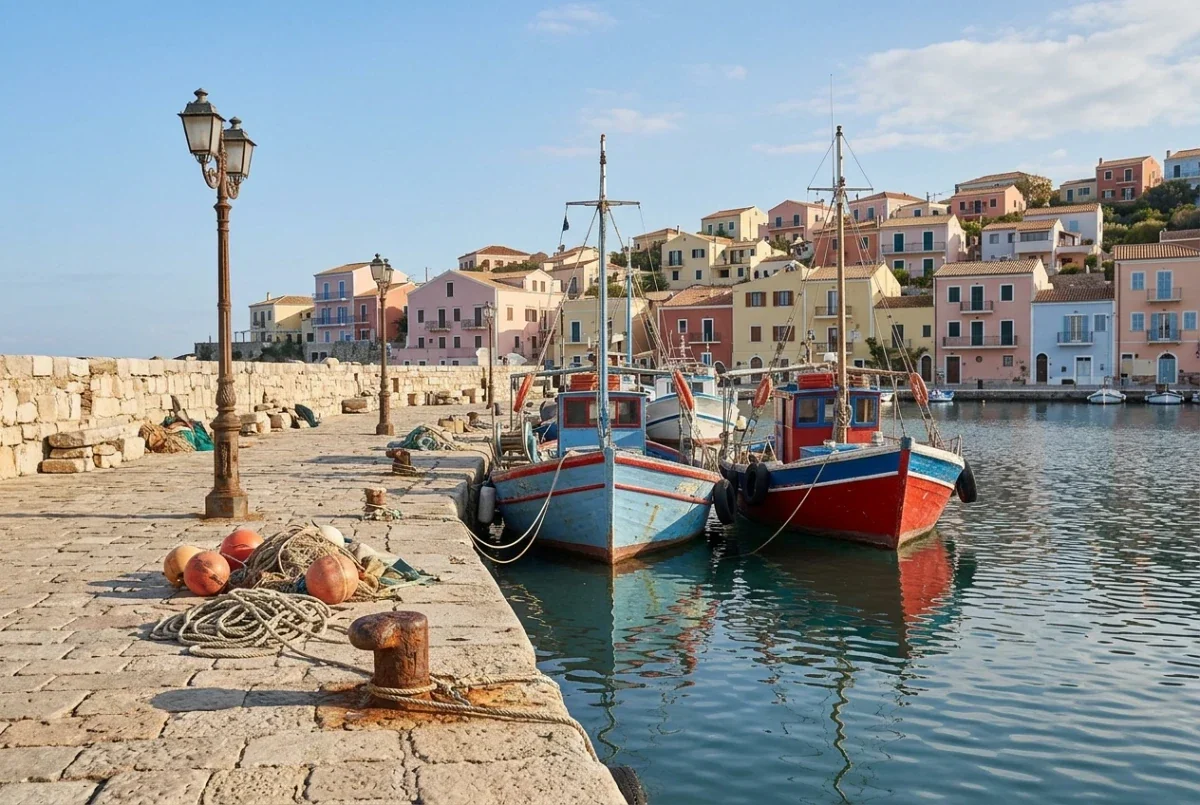 Original: AI-generated color photo.
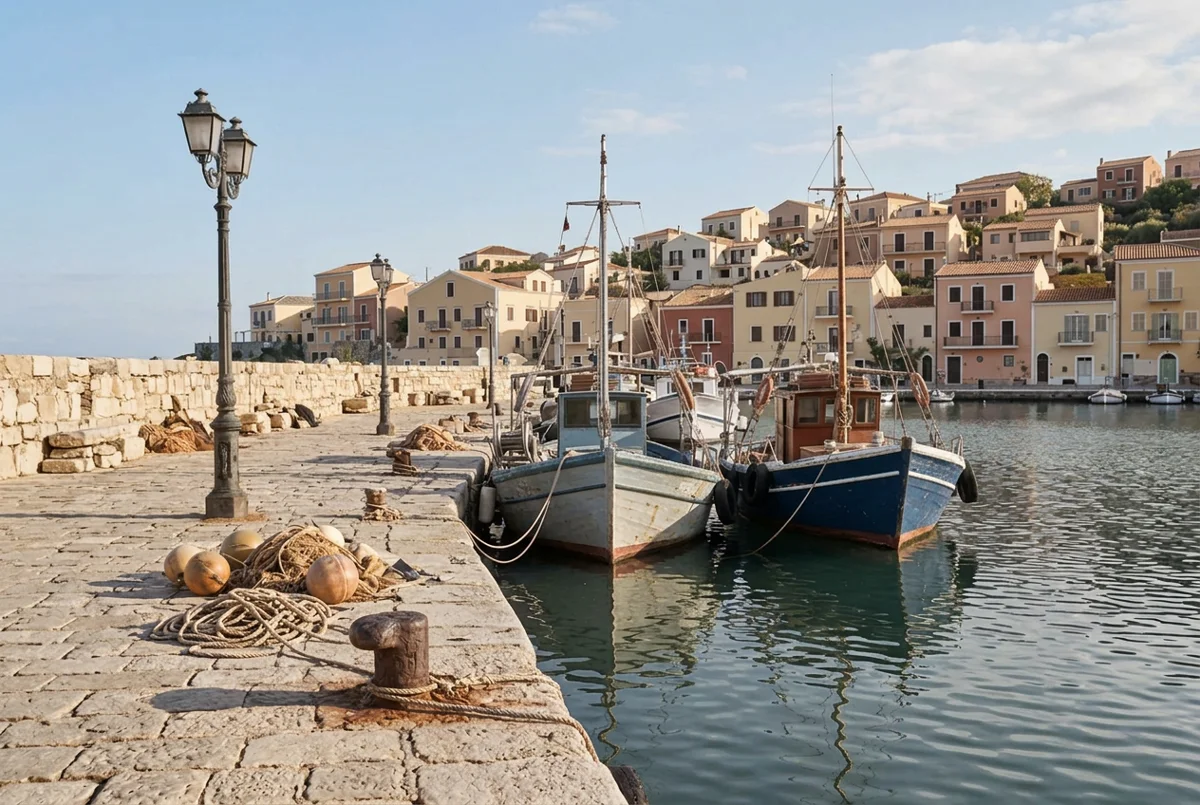 Result: a real Nano Banana 2.1 edit in PicOnTap, November 15, 2026. The red boat turned navy, the pale blue boat grey-white and the orange buoys cream.
The harbor shows it best. The sky, houses and quay were right (7 of 9 marked areas), but the red hull turned navy, the pale blue hull turned grey-white and the orange buoys turned cream. The whole picture came back at about 72 percent of the original's color strength.
Does it add things or change what is there?
Yes, in the busiest scene. The market photo came back more vivid than the original, and the model changed what some things were.
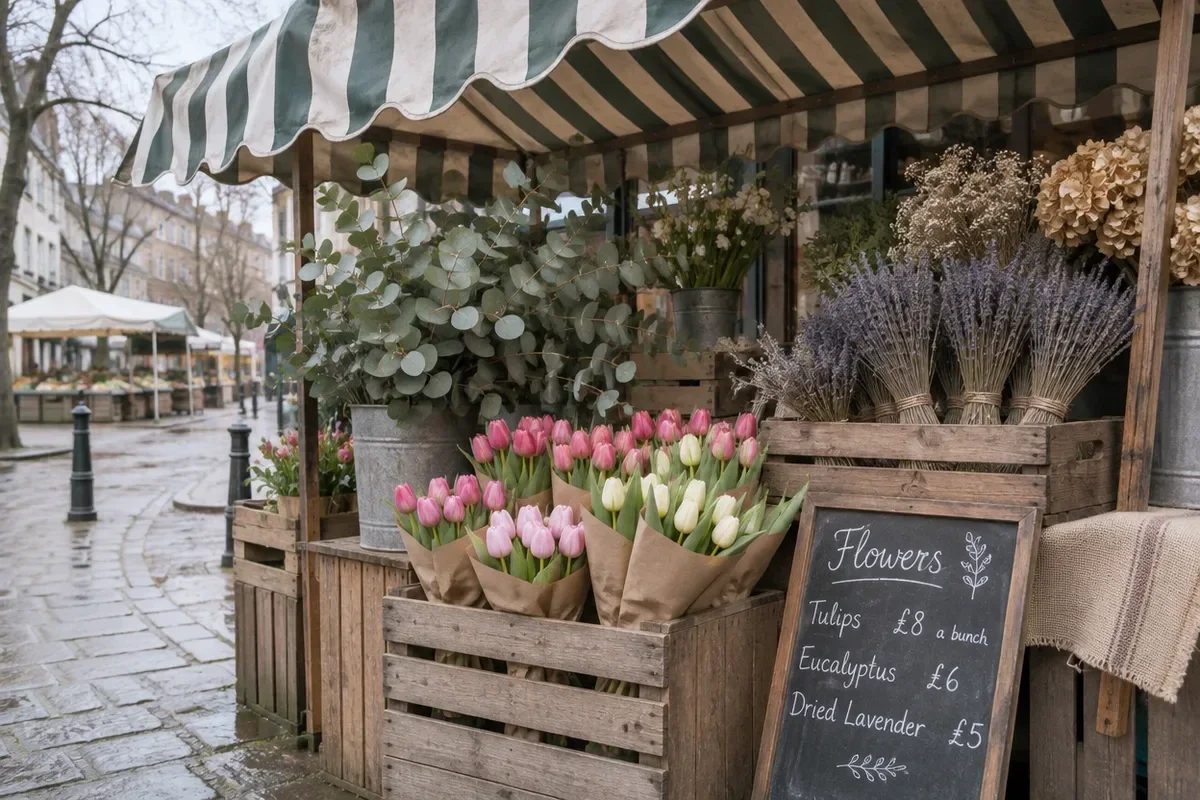 Original: AI-generated color photo.
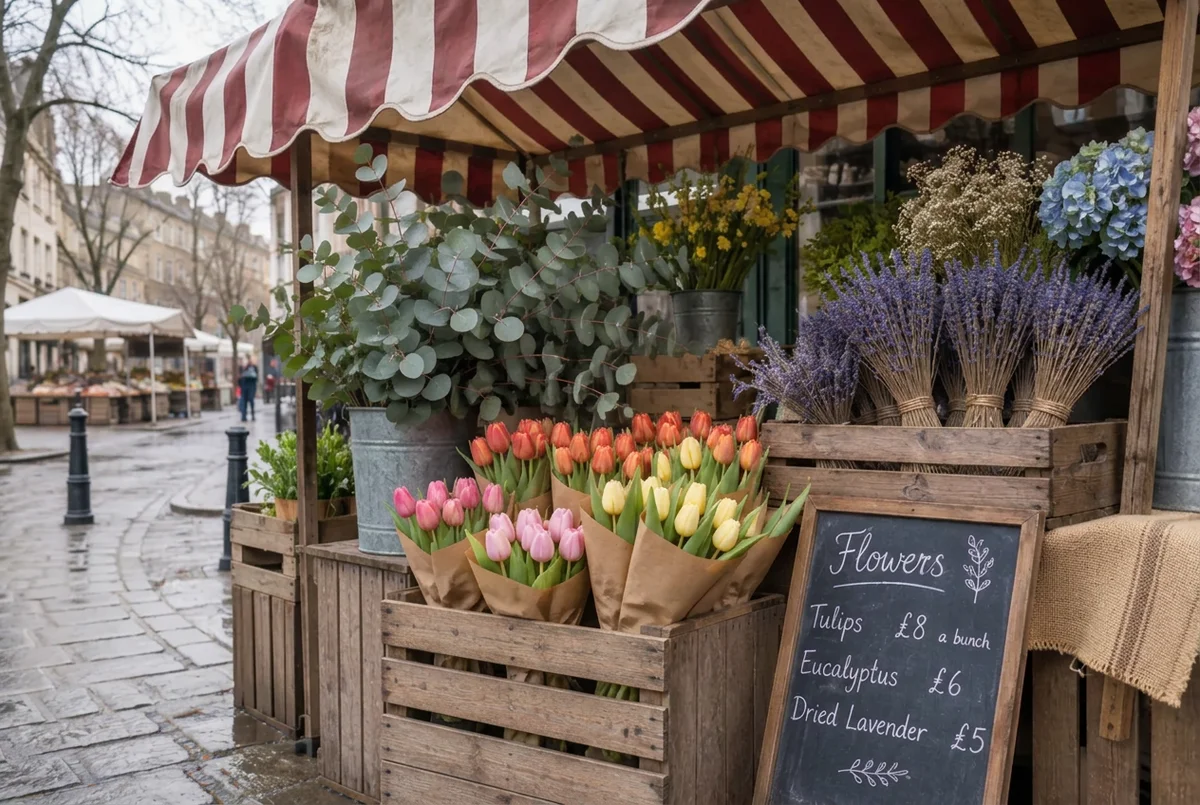 Result: a real Nano Banana 2.1 edit in PicOnTap, November 15, 2026. The chalkboard text did not change.
The green awning came back red, the tan hydrangea blue, some pink tulips orange-red and a pot of small white flowers bright yellow. Two pedestrians appeared in the street behind the stall, one in a blue coat and one in red, where the original has nobody, and a small pot of pink flowers by the post came back as green leaves. The chalkboard text stayed exactly as it was.
What happens to a toy with no natural color?
It gets guessed and desaturated. With the long prompt the felt robot came back with a grey-blue head, a cream body, brown buttons and grey boots. With the colors named in the prompt, the head and buttons were right.
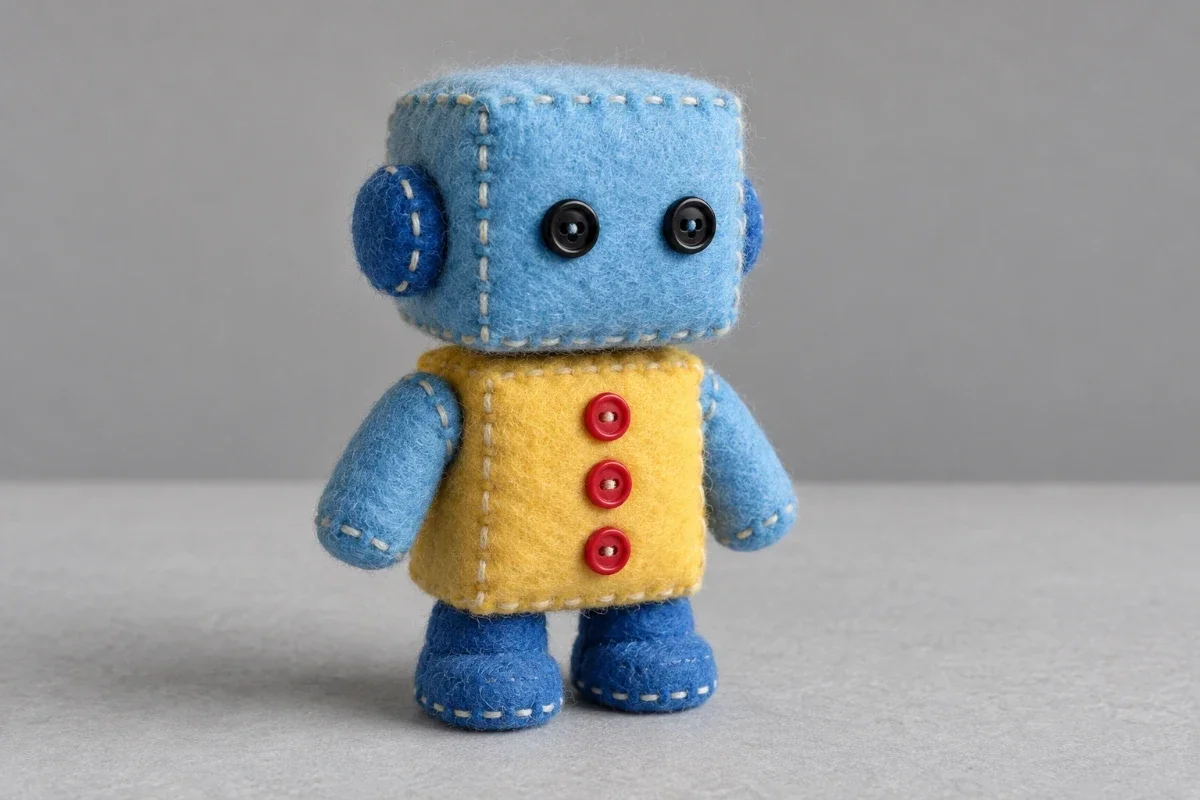 Original: AI-generated color photo.
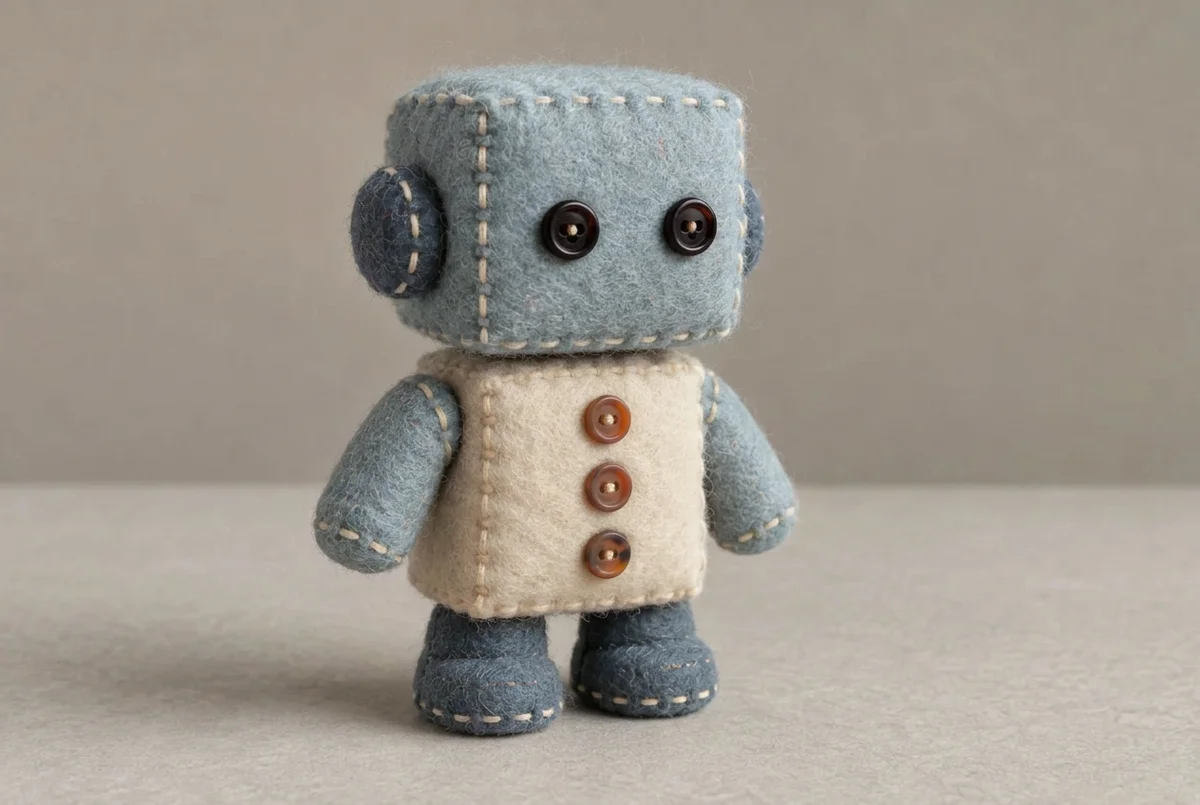 Result without any color in the prompt: a real Nano Banana 2.1 edit in PicOnTap, November 15, 2026.
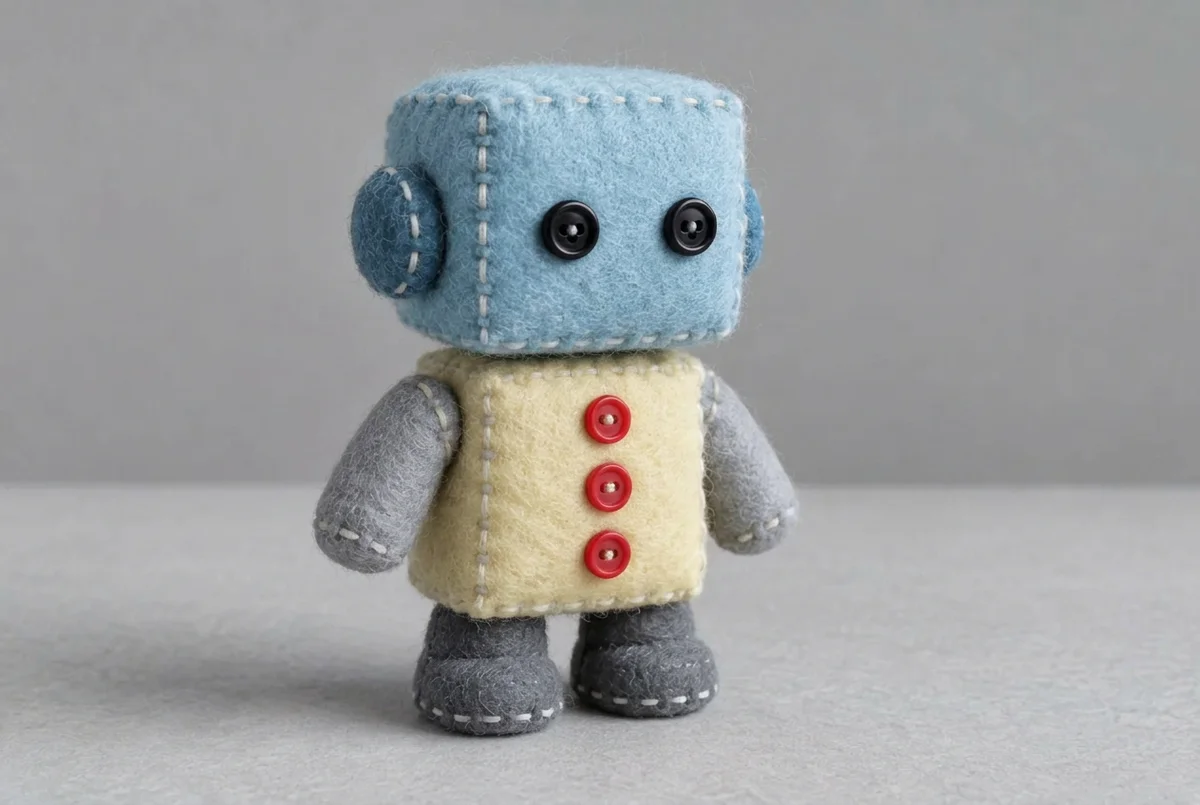 Result with the colors named in the prompt: a real Nano Banana 2.1 edit in PicOnTap, November 15, 2026. The unnamed arms and boots stayed grey.
When is AI colorization wrong?
- Clothing, bags and small objects: the color is a guess, and a confident wrong guess looks the same as a right one.
- Objects with an arbitrary color: boats, felt and awnings can come back in a different hue.
- Strength of color: results came back 28 to 40 percent paler in the quiet scenes and about 35 percent more vivid in the busy one, so do not trust how bright it looks either.
- Invented details: in the busiest scene it added two people and changed flowers into leaves.
- What we did not test: real old prints with grain, scratches or fading, and scans against phone photos. Our originals were clean AI-generated photos turned grey, not real old photographs.
If a color matters, ask someone who knows the photo and tell the model.
FAQ
Can ChatGPT colorize images?
We did not test ChatGPT, so we cannot say how accurate it is. Assistants such as ChatGPT can take a prompt to colorize a photo, and the same limit applies to any tool: a grey photo does not contain the colors, so someone is guessing. Our results are from Nano Banana 2.1 in PicOnTap only.
Is it safe to upload old family photos?
Read the privacy page before you do. PicOnTap's privacy page says that uploaded originals, selections and results are stored to run the editor, that new files currently expire 365 days after creation, that images go to the selected model provider and through automated content moderation, and that training terms depend on that provider. The file is sent with its metadata unless you remove it first, and the page does not promise that every provider handles images the same way.
Does it work on old, grainy or scratched prints?
We did not run that case, so we cannot say. All our originals were clean. Scan the print and keep the unedited copy.
How do I get the right colors?
Say them. In our test the named colors were used and the unnamed ones were guessed, so write what you know: "the jacket was dark blue, the car was red". If nobody knows, accept that the colors are an estimate.
Is it free, and do I need to sign up?
You can try it without an account. Every visitor gets a free daily allowance of 2 credits that resets at 00:00 UTC, and the full-size download has no watermark. A Nano Banana 2.1 edit at 1K cost 2 credits in our test.
Should I colorize without AI?
You can, with a photo editor and hours of work, or by asking a person who knows the photo. We did not test those routes.
Bottom line
AI colorization is accurate where the grey photo gives a clue and a guess where it does not. Skin, sky, water and stone came back right; jackets, boats, awnings and toys did not. Jump to the editor below these steps, colorize one photo, name the colors you know and compare the result with your original before you share it.
Keep reading
 GuidesAI Hairstyle Prompts: 7 Tests on Face, Hair and BackgroundAn AI hairstyle prompt changed length, color, curls, bangs and cuts in all 7 of our tests. Clothes and background stayed, but the face was slightly redrawn in 4 of 7.
 GuidesCan AI Restore Old Photos? We Damaged 6 Photos and CheckedYes, AI can restore old photos. We damaged 6 AI-made photos, ran 7 real edits and compared every result with the clean original: damage gone, faces smoother, one print colorized.
 GuidesAI Christmas Photo Prompts That Keep Your Face: 12 Real TestsWe ran 12 real edits to test AI Christmas photo prompts. The "keep my face" line mattered less than we expected; face size and how much you change mattered most.