Nano Banana 2.1 vs Pro (2026): Which Should You Use?
Nano Banana 2.1 costs about a quarter of Nano Banana Pro per 1K image and leads Google's own ratings. See where Pro still wins and how to choose.

Nano Banana 2.1 vs Pro, in short: Nano Banana 2.1 is the better default for most image generation and photo editing. It costs about a quarter of Nano Banana Pro per 1K image ($0.0336 vs $0.134) and scores higher on every rating in Google's model card. Choose Nano Banana Pro for five-person casts, style references and dense in-image text.
Want to see 2.1 on your own photo first? The Nano Banana 2.1 photo editor on PicOnTap needs no sign-in and costs 2 credits per edit at 1K (3 at 2K, 5 at 4K).
How we put this together: prices, release dates and benchmark scores come from Google's Gemini API documentation and the Nano Banana 2.1 model card, last verified on October 14, 2026. The edit examples are real Nano Banana 2.1 results from the PicOnTap editor, and user feedback comes from public Reddit threads.
TL;DR
- Price: 2.1 costs $0.0336 per 1K image in the Gemini API. Pro costs $0.134, about four times more.
- Quality: Google's own side-by-side human ratings put 2.1 ahead of Pro in text-to-image and in editing, even with thinking turned off.
- Where Pro still leads: five character references, three style references, and small or dense text inside images.
- Real-world reports: early Reddit feedback on 2.1 is mixed, and several users report weaker prompt adherence than Google's ratings suggest.
- Nano Banana 2: Google has deprecated it in the Gemini API and recommends moving to 2.1.
What is Nano Banana 2.1?
Nano Banana 2.1 (model ID gemini-nano-banana-2.1) is Google's high-efficiency model for image generation and conversational editing. It became generally available in the Gemini API on October 6, 2026. It is based on Gemini 3.6 Flash and replaces Nano Banana 2 (Gemini 3.1 Flash Image).
Google lists the main changes as better visual quality and prompt adherence, stronger multi-turn character consistency, more accurate text and infographic layouts, and fixed tiling on very wide and very tall formats (1:4, 4:1, 1:8 and 8:1) at 2K and 4K. It also adds grounding with Google Web and Image Search, and three thinking levels: minimal, medium (the default) and high.
What is Nano Banana Pro?
Nano Banana Pro is the name for Gemini 3 Pro Image (model ID gemini-3-pro-image), Google's premium image model built on Gemini 3. It arrived as a preview on November 20, 2025 and became generally available on May 28, 2026.
Google calls Pro "the premium choice for the most complex visual tasks." Its product page focuses on legible text for posters and diagrams, translating text inside images, and studio-style control over camera angle, depth of field, lighting and color grading.
Nano Banana 2.1 vs Pro: side-by-side comparison
How much does each model cost per image?
Google's Gemini API list prices (standard paid tier, checked October 14, 2026):
- Nano Banana 2.1: $0.0336 per 1K image, $0.0504 per 2K image, $0.113 per 4K image.
- Nano Banana Pro: $0.134 per 1K or 2K image, $0.24 per 4K image.
That makes Pro about 4 times the price of 2.1 at 1K, about 2.7 times at 2K and about 2.1 times at 4K. Input tokens cost $1.50 per million for 2.1 and $2.00 per million for Pro. The Batch API halves these rates for jobs that can wait.
Which model makes better images?
On Google's own ratings, Nano Banana 2.1 makes better images than Pro. The Nano Banana 2.1 model card reports side-by-side human ratings as Elo scores. In overall text-to-image preference, 2.1 scores 1050 with thinking and 1015 without, against 935 for Pro. For infographic design the scores are 1048 and 1001 against 912. An automated factuality rater scores infographics 0.521 and 0.328 against 0.265.
These are Google's evaluations of its own models. They show the direction, but run your own prompts before you switch a production workflow.
Do early users agree with the benchmarks?
Not entirely. In public Reddit threads from the first week after launch, users are split. Several people in r/GeminiAI report that 2.1 ignores parts of their prompts or drifts further from them than Nano Banana 2 or Pro, and some tie this to stricter moderation in Google's own apps. Others in r/singularity describe a clear upgrade over Nano Banana 2, especially in the Gemini app with extended thinking turned on.
An earlier r/GeminiAI post by a user who ran Nano Banana 2 and Pro on the same jobs lands on a familiar split: the faster model for quick iterations and volume, Pro for complex compositions, accurate text and tricky lighting.
In our own relighting edits shown below, 2.1 followed the instructions and kept the named objects in place. Treat both the benchmarks and the forum reports as reasons to test your own images, not as a final verdict.
Which is better for editing existing photos?
Editing is where the gap is widest. In the model card, 2.1 with thinking leads Pro in every editing row:
- General editing: 1026 vs 939
- Mask or doodle-based editing: 1049 vs 927
- Product consistency: 1024 vs 965
- Multi-character consistency: 1106 vs 1011
- Stylization: 1062 vs 990
With thinking turned off, 2.1 still beats Pro in all seven editing categories Google lists.
Which handles text inside images better?
Text is Pro's home ground. Google markets Pro for sharp, legible text in posters, diagrams and product mockups, and for translating text inside an image for other markets. 2.1 improved text rendering, but its model card lists a known weakness: small text is often blurry at 1K, and long paragraphs remain hard.
An independent same-prompt test by Fuser on October 6, 2026 points the same way. Pro was the closest match to a reference face and the only model with readable shop signs. 2.1 was the only model that followed the lighting brief in both the photo and the product test. One run per model is a small sample, but it matches Google's own positioning.
How many reference images can you use?
Both models accept up to 14 reference images, but they split them differently:
- Nano Banana 2.1: up to 4 characters and up to 10 objects.
- Nano Banana Pro: up to 5 characters, up to 6 objects and up to 3 style references.
For a scene with five recurring people, or a look that has to match a style board, Pro is the safer pick. For a product set with many items, 2.1 holds more objects.
Where can you use each model?
- Nano Banana 2.1: the Gemini app, Google AI Studio, the Gemini API, AI Mode in Google Search, Google Ads, Google Flow and Google Stitch, according to its model card.
- Nano Banana Pro: the Gemini app, Google AI Studio and the Gemini API (gemini-3-pro-image).
Resolution, inputs and extras
Both models output 1K by default and can render 2K or 4K. Each has extras:
- Nano Banana 2.1: video as an input, grounding with Google Image Search, and a choice of thinking levels.
- Nano Banana Pro: style references, and interleaved responses that mix text and illustrations, such as an illustrated step-by-step guide.
Every image from both models carries Google's invisible SynthID watermark.
What the numbers mean for photo editing
Most comparisons test text-to-image prompts. If your job is editing photos you already have, such as relighting a product shot or fixing a flash snapshot, the editing rows above matter more than the generation scores.
PicOnTap is a browser-based AI image editor: upload a photo and describe the change in a sentence to remove objects, replace backgrounds, recolor details or restore old photos. Nano Banana 2.1 is one of its models, and the edits below are real 2.1 results from the editor, made on AI-generated originals.
 Original: an AI-generated harbor in afternoon light.
 Result: a real Nano Banana 2.1 edit in PicOnTap. The original image is AI-generated.
The prompt asked for blue hour with the street lamps and a few windows lit, then named what had to stay: "Keep both boats, the ropes, the buoys and the bollard unchanged." In the result the lamps and windows glow and reflect in the water, while the boats, ropes, buoys and bollard keep their shape and place.
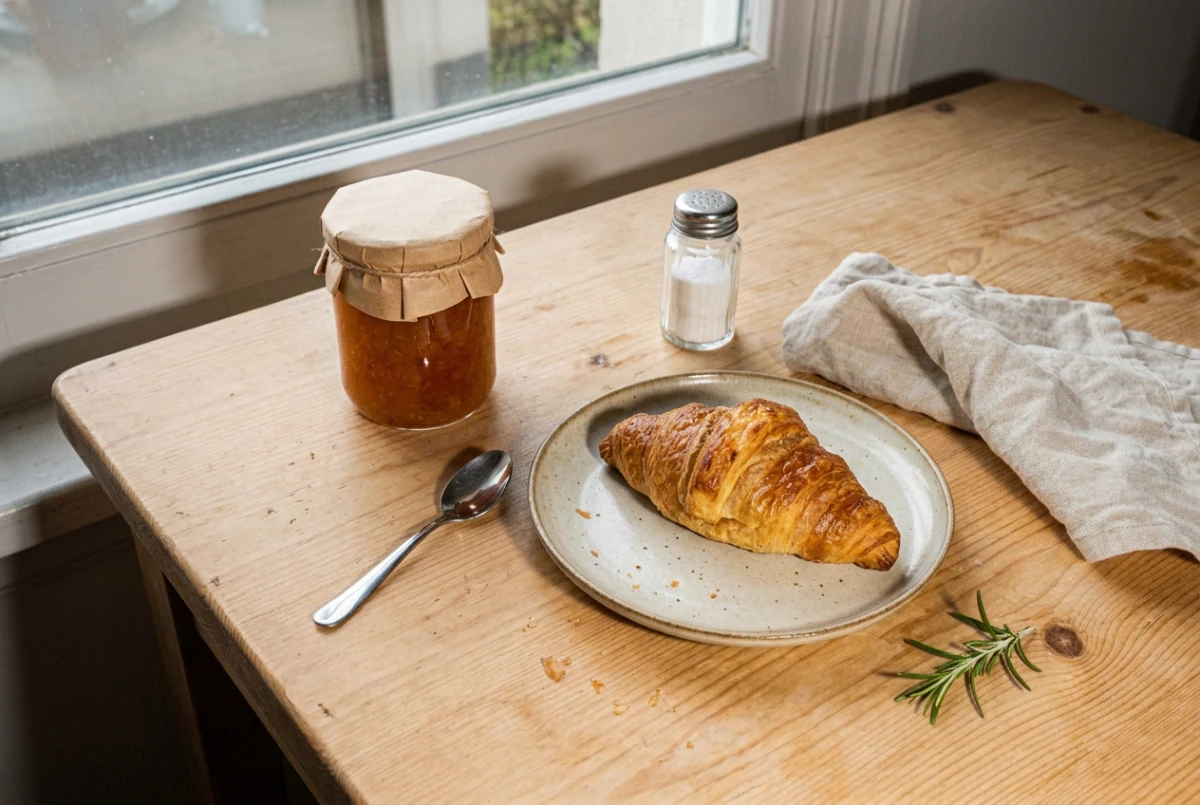 Result: a real Nano Banana 2.1 edit in PicOnTap that replaced harsh flash with window light. The original image is AI-generated.
The second edit replaced harsh camera flash with soft morning light from the window. The prompt listed every object to keep: the croissant, the jam jar and its paper lid, the salt shaker, the spoon, the napkin and the rosemary. The hard flash shadows are gone and the objects stay where they were.
Both prompts follow one pattern: describe the new light first, then name each object that must not change. For more on this, see our guide to writing clearer image editing prompts.
What should you check in a Nano Banana 2.1 edit?
Check the places Google's model card lists as known limitations:
- Small text: labels and fine print can blur at 1K.
- Faces and characters: consistency between the input and the output is not always perfect.
- Pose: in rare cases the subject keeps its original pose.
- Left and right: spatial instructions are occasionally confused.
Compare the result with the original at the same zoom before you download it.
Which should you choose?
- Choose Nano Banana 2.1 for everyday generation, photo edits such as relighting and cleanup, product sets with many objects, high volumes, and very wide or tall formats at 2K and 4K.
- Choose Nano Banana Pro for posters and infographics with small or dense text, translated text in several languages, scenes with five recurring characters, and work that must match up to three style references.
- Not sure? Run the same prompt and the same source image through both at the resolution you plan to publish, then compare crops of faces, labels and edges.
For photo edits, you can start with the Nano Banana 2.1 photo editor: upload an image, describe the change, and compare the result with the original.
FAQ
Is Nano Banana Pro worth it?
Nano Banana Pro is worth it when an image depends on small or dense text, translated text, five recurring characters or style references. For everyday generation and photo editing, Nano Banana 2.1 scores higher in Google's ratings at about a quarter of the 1K price.
What's the best version of Nano Banana?
For most new work, the best version is Nano Banana 2.1. Google recommends it for new projects, and it leads every row of Google's published ratings. Nano Banana Pro remains the specialist choice for complex text and larger casts of characters.
Is Nano Banana 2 still the best?
No. Google deprecated Nano Banana 2 (gemini-3.1-flash-image) in the Gemini API when 2.1 launched and recommends migrating. In the 2.1 model card, Nano Banana 2 scores 990 in overall preference, behind 2.1 at 1050.
Which is better for me, Nano Banana 2 or Nano Banana Pro?
If you are choosing today, compare 2.1 and Pro instead. 2.1 replaces Nano Banana 2 at half its 1K image price ($0.0336 vs $0.067), and Nano Banana 2 already scored ahead of Pro in overall preference (990 vs 935).
Should you use Nano Banana 2 Lite instead?
Only for simple, high-volume 1K work. Google calls Nano Banana 2 Lite its fastest and cheapest image model, but its 1K image price is the same as 2.1 at $0.0336; the saving is on input tokens ($0.25 vs $1.50 per million). Lite outputs only 1K images, takes no character references, has no Google Search grounding, and is not optimized for multi-reference or multi-turn editing.
Do Nano Banana images have a watermark?
Yes. Every image generated by Google's Nano Banana models includes an invisible SynthID watermark.
How much does a Nano Banana 2.1 edit cost in PicOnTap?
A Nano Banana 2.1 edit in PicOnTap costs 2 credits at 1K, 3 at 2K and 5 at 4K. Free credits reset daily at 00:00 UTC, and the editor shows the cost before you submit.
Conclusion
The Nano Banana 2.1 vs Pro choice is less close than the names suggest. 2.1 is cheaper, newer and ahead on every rating Google has published, so start there and switch to Pro when text, larger casts or style references demand it. To see how 2.1 handles your own picture, open the Nano Banana 2.1 photo editor.
Sources
- Gemini Nano Banana 2.1 model page, Google AI for Developers
- Nano Banana image generation guide, Google AI for Developers
- Gemini Developer API pricing, Google AI for Developers
- Gemini API release notes, Google AI for Developers
- Nano Banana 2.1 model card, Google DeepMind
- Nano Banana Pro, Google DeepMind
- Nano Banana 2.1 thread, r/GeminiAI
- Meet Nano Banana 2.1 thread, r/singularity
- Nano Banana 2 vs Nano Banana Pro by task, r/GeminiAI
- Nano Banana 2.1 vs Nano Banana 2 vs Pro: Same-Prompt Test, Fuser