AI Christmas Photo Prompts That Keep Your Face: 12 Real Tests
We ran 12 real edits to test AI Christmas photo prompts. The "keep my face" line mattered less than we expected; face size and how much you change mattered most.
A good AI Christmas photo prompt does two things: it names the Christmas change, then says what must stay the same. In our 12 tests, the popular "keep my face" line changed little on a clear portrait. What decided whether a face survived was how big it was in the photo and how much else we changed.
Jump to the editor in this article to try these prompts on your own photo, or use our AI Christmas photo generator with one-tap presets. PicOnTap is a browser-based AI image editor: upload a photo and describe the change in a sentence to remove objects, replace backgrounds, recolor details or restore old photos.
How we tested: on November 12, 2026 we ran 12 real edits in PicOnTap on five AI-generated photos, with no real people: 11 with Nano Banana 2.1, a Google image model, and one with GPT Image 2.6, an OpenAI model, all at 1K. Each prompt ran once, and two ran a second time to check how much results vary. We scored every face with an open-source face recognition model (OpenCV SFace): 1.0 means identical features, and different people scored 0.13–0.27 in our calibration. A small sample, so your results can differ.
TL;DR
- The "keep my face" line: on a clear portrait, two runs with it scored 0.857 and 0.850, and two runs without it 0.838 and 0.810. A small edge, and the same man in all four. Its clearest effect was on framing.
- Long viral prompts: a 100-word "8K studio portrait" prompt redrew the whole scene and still kept the face at 0.824.
- JSON vs plain sentences: the same content in both formats gave near-identical photos (0.933 and 0.904). The words mattered, not the brackets.
- Small faces plus new clothes: this is where faces changed. A couple in matching sweaters scored 0.66 and 0.54.
- Card text: "Merry Christmas" and "2026" came out spelled right on the first try.
Can an AI Christmas photo prompt really keep your face?
Mostly, if the face is large and clear and you change the setting rather than the person. An image model does not paste your face into a new picture. It redraws the whole image and tries to keep what you asked it to keep, so every result is a close copy, never the original pixels.
In our tests that worked well for single portraits, where every result stayed between 0.81 and 0.93. It also worked for a small family photo where we only swapped the beach for snow: the three faces scored 0.82 to 0.87. It broke on a full-length couple photo when we also asked for new sweaters. Both faces were small, and the model redrew them. Anyone who knows that couple would notice.
How to use these prompts on your own photo
- Upload a clear photo in the editor just below these steps. Faces should be visible and not tiny. PNG, JPG and WebP files up to 10 MB work.
- Pick a card or paste a prompt from the list below, then change "him", "her" or "the dog" to whoever is in your photo.
- Zoom in on the faces before you download. Compare them with your original, especially in group photos.
Each Nano Banana 2.1 edit at 1K cost 2 credits in our test and took 38 to 58 seconds. You see the cost before you submit, and you can try it with free credits, no sign-up needed.
AI Christmas photo prompts you can copy
Every prompt below is the exact text we ran. Each one names the Christmas change first, then lists what must stay.
Santa hat on a pet or profile picture
"Put a small red Santa hat on the dog's head. Keep the dog and everything else in the photo exactly the same."
The hat sat between the ears, and the rug, the sofa and even a blue plastic bag stayed where they were. For a profile picture, swap "the dog" for "me" or "the person".
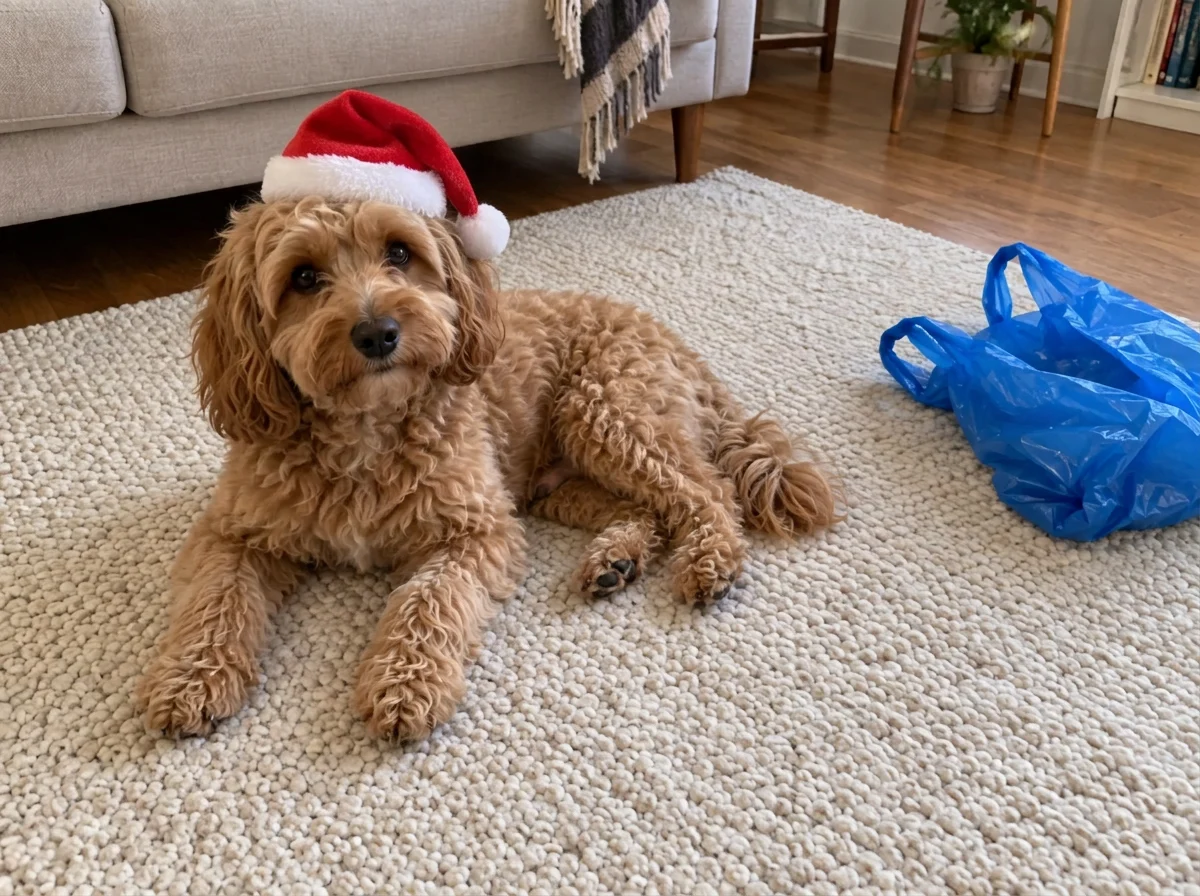 The Santa hat prompt. Original: AI-generated. Result: a real Nano Banana 2.1 edit in PicOnTap, November 2026.
Christmas living room with the same face
"Turn this into a Christmas photo: put him in a cozy living room with a decorated Christmas tree and warm string lights, and dress him in a red knit Christmas sweater. Keep his face, expression, hairstyle and the framing exactly the same as in the original photo."
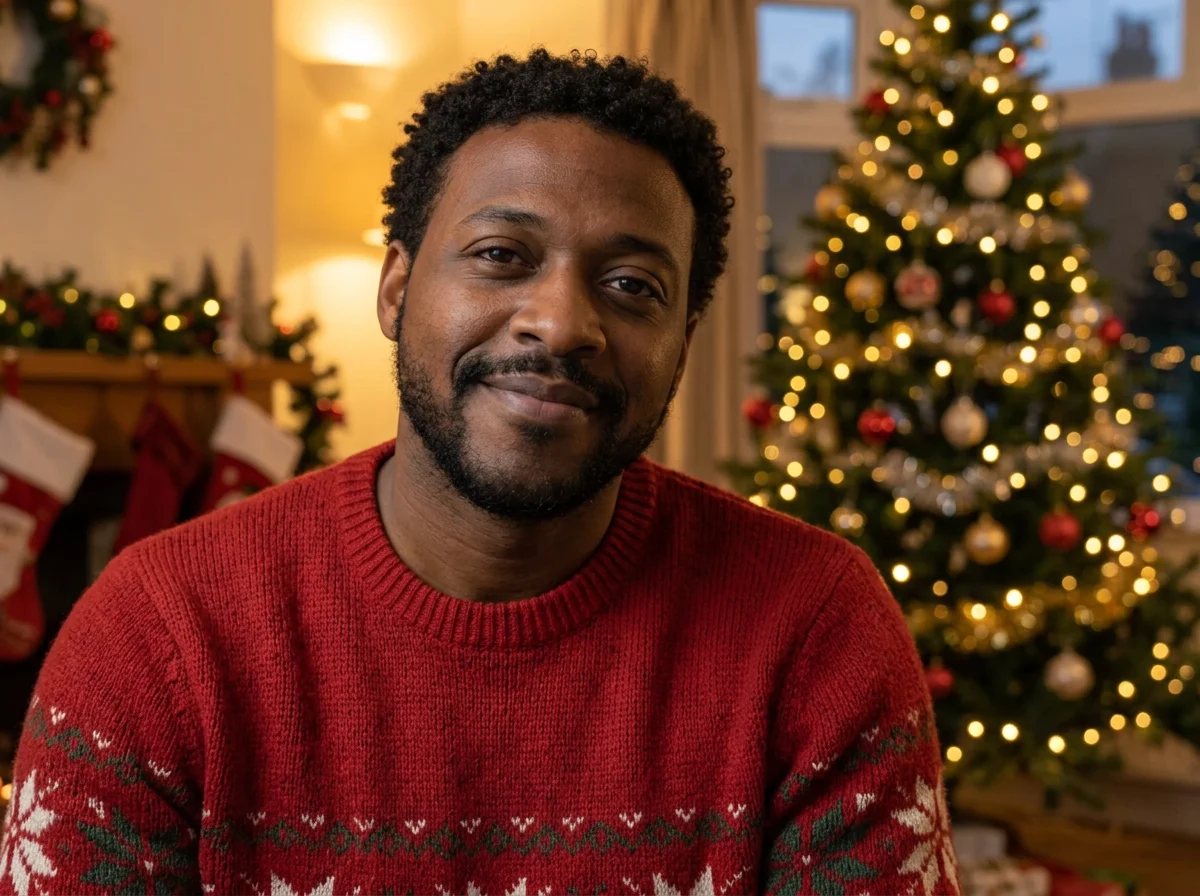 The living room prompt. Face score 0.857. Original: AI-generated. Result: a real Nano Banana 2.1 edit in PicOnTap, November 2026.
Couples in matching Christmas sweaters
"Turn this into a Christmas photo of the couple: dress them in matching red knit Christmas sweaters and put them in front of a decorated Christmas tree with warm lights and wrapped presents. Keep both faces, expressions, poses and the framing exactly the same."
The sweaters, the tree and the pose all came out well. The faces did not hold as well; see the fixes further down.
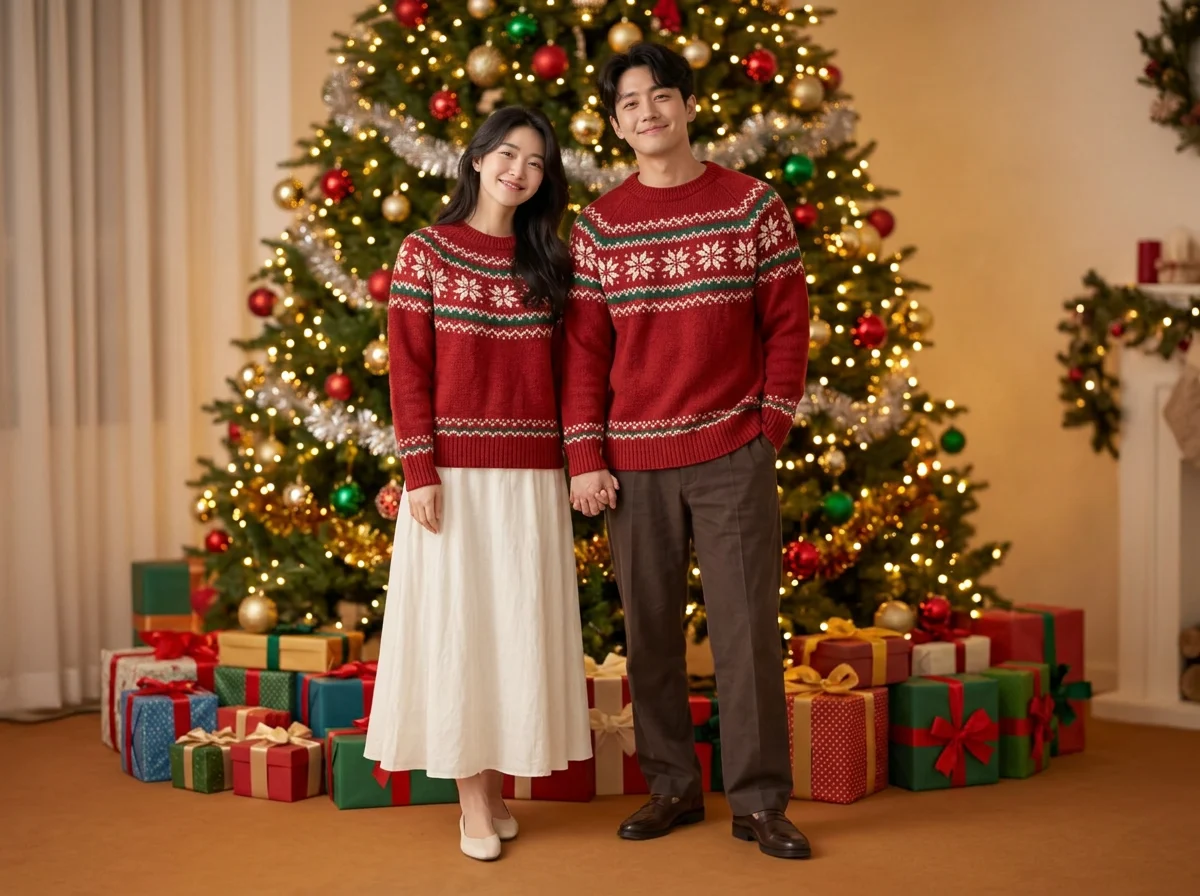 The couples prompt. Face scores 0.66 and 0.54. Original: AI-generated. Result: a real Nano Banana 2.1 edit in PicOnTap, November 2026.
Snowy Christmas café
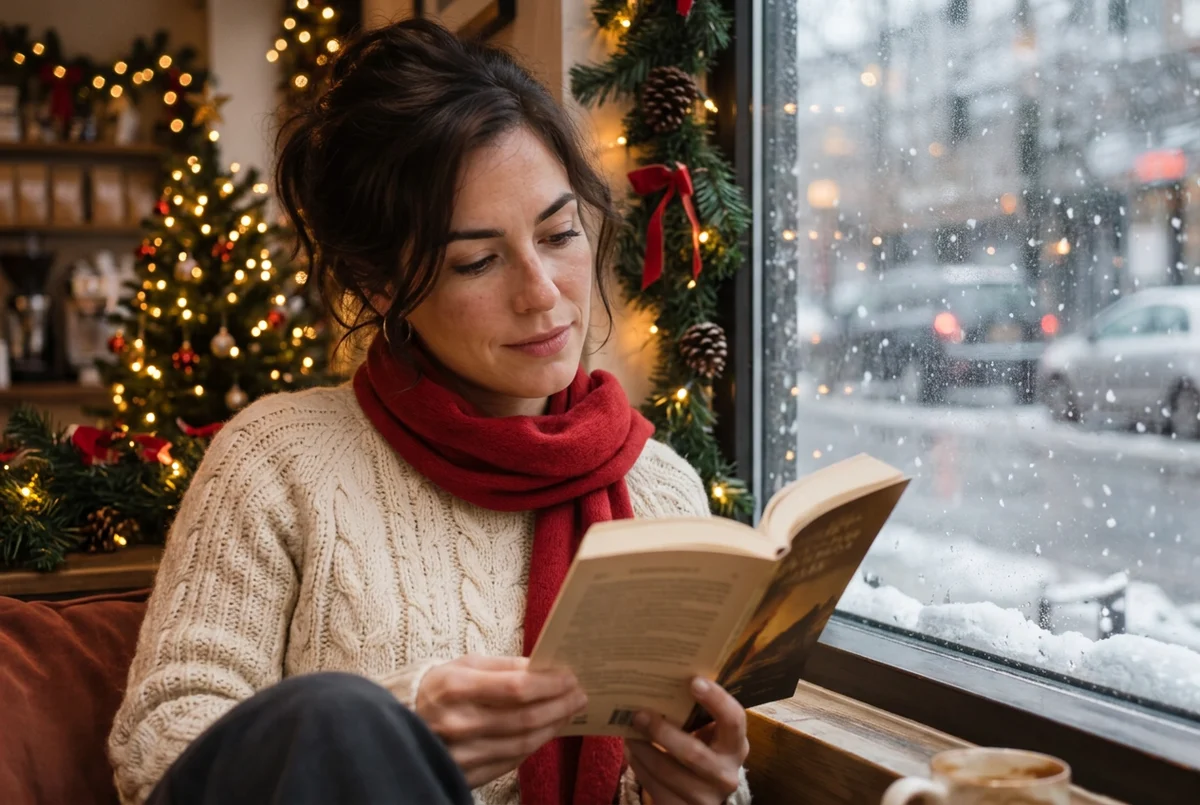
"Turn this into a Christmas photo: she is still reading her book by the window of a cozy Christmas cafe, with snow falling outside, a small decorated Christmas tree and string lights behind her. Dress her in a cream cable-knit sweater and a red scarf. Keep her face, hair, expression and the framing exactly the same. Make it look like a real photo with warm light and soft bokeh."
The café prompt. Face score 0.904. Original: AI-generated. Result: a real Nano Banana 2.1 edit in PicOnTap, November 2026.
Christmas card with text
"Turn this into a Christmas card: replace the beach with a snowy landscape and a decorated Christmas tree with warm lights, and add the words "Merry Christmas" and "2026" in elegant gold lettering at the top. Keep the family exactly as they are: same faces, clothes, pose and framing."
Both lines of text were spelled correctly. The catch: the family still wears summer clothes in the snow, because we told the model to keep their clothes.
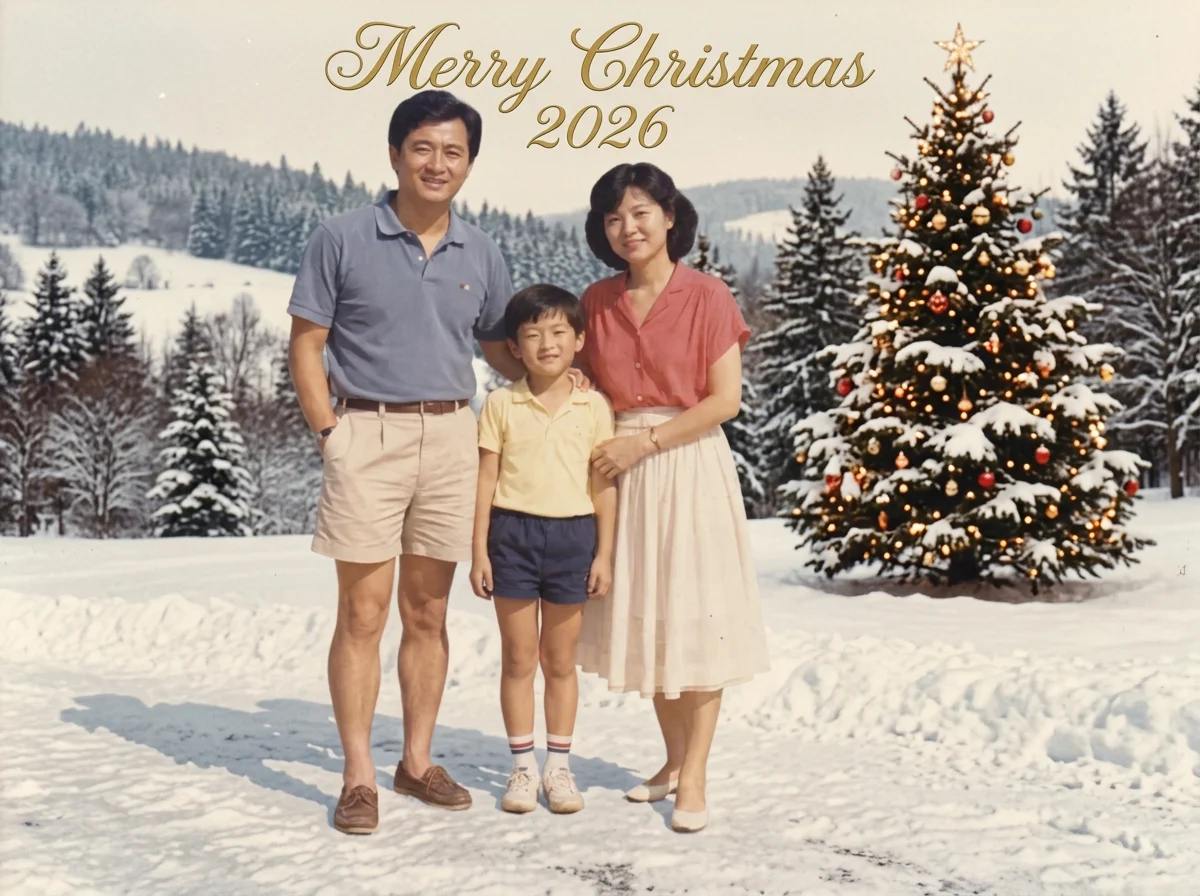 The card prompt. Face scores 0.82 to 0.87. Original: AI-generated. Result: a real Nano Banana 2.1 edit in PicOnTap, November 2026.
Does "keep my face" actually work?
Almost every viral prompt includes a line like "use my real facial features exactly as they are". We ran the living room prompt four times on the same portrait: twice without that line and twice with it.
- Without the line: 0.838 and 0.810.
- With the line: 0.857 and 0.850.
The line gave a small, steady edge, but all four results look like the same man. Two runs of the same prompt without the line differed by almost as much as the gap between the groups, so this is a nudge, not a face saver. The bigger difference was the picture around him: one run without the line moved him to the side of the frame and zoomed out, while both runs with it kept the original framing.
We also ran the same prompt with the line on GPT Image 2.6. It scored 0.931 and kept the original's darker, moodier light, at 4 credits instead of 2. That is a single run, so treat it as a hint, not a ranking.
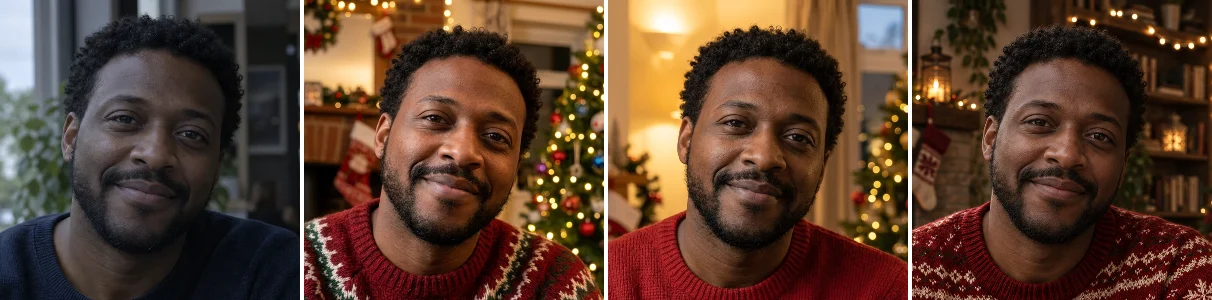 From left: original; without the line (0.838); with the line (0.857); with the line on GPT Image 2.6 (0.931). Original: AI-generated. Results: real edits in PicOnTap, November 2026.
Keep the line. It costs nothing and it helps hold the framing. Just don't expect it to rescue a face the model has decided to redraw.
Do long viral prompts or JSON prompts work better?
Last December's AI Christmas photo trend spread through long copy-and-paste prompts: a paragraph about an 8K studio, a 55mm lens, sequins and giant candy canes, plus a line asking the model not to touch your face. Many were written as JSON. When we asked ChatGPT whether those beat a one-line prompt, it said structured prompts usually work better. Gemini said JSON is overrated. So we tested both.
A long viral-style prompt. We wrote a 100-word studio prompt in that style: velvet armchair, gold and red ornaments, fake snow, a green velvet blazer. The model rebuilt the whole scene and changed his pose, and the face still scored 0.824, in the same range as the short prompts.
 The long viral-style prompt. Face score 0.824. Original: AI-generated. Result: a real Nano Banana 2.1 edit in PicOnTap, November 2026.
JSON vs plain sentences. We wrote the café prompt twice with the same details, once as JSON with keys for identity, outfit, scene and lighting, and once as the plain sentences above. The two photos are almost interchangeable: same sweater, same scarf, same snowy window. The JSON version scored 0.933 and the plain one 0.904, about the same gap we saw between two runs of one prompt (0.028). No brackets or keys leaked into the image.
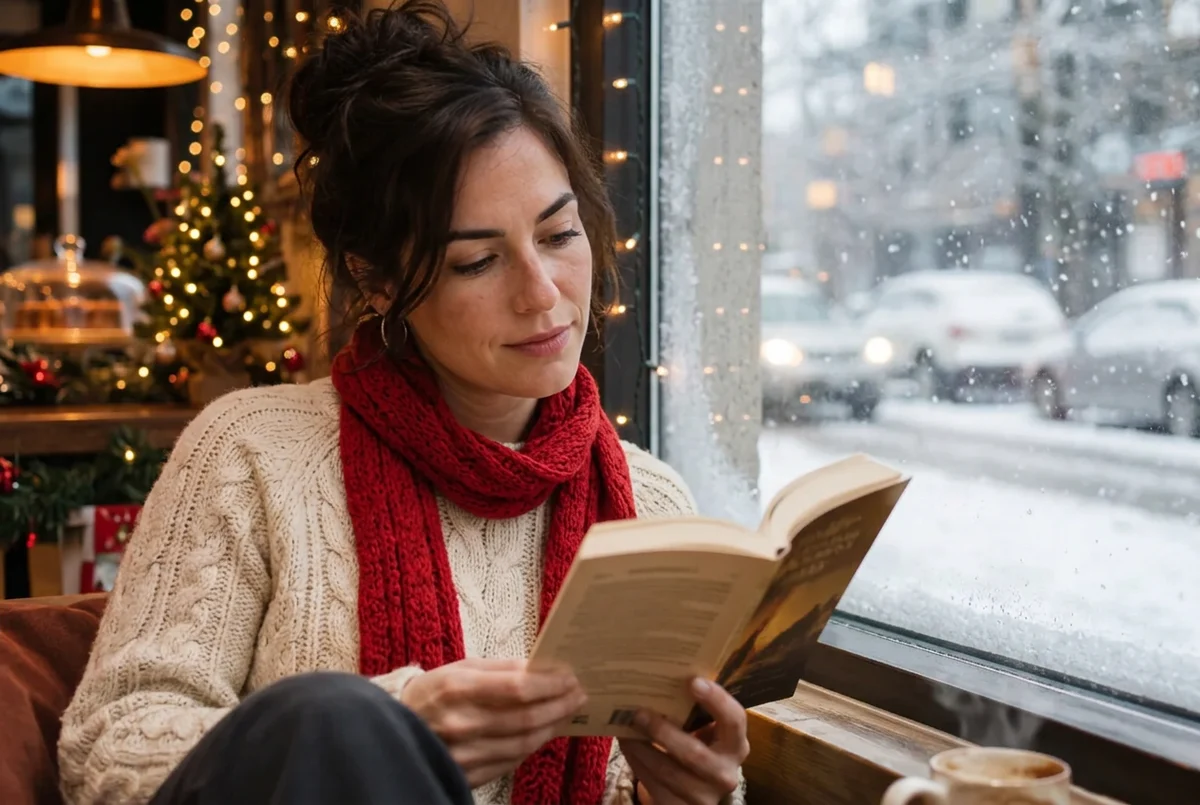 The JSON version of the café prompt. Face score 0.933. Original: AI-generated. Result: a real Nano Banana 2.1 edit in PicOnTap, November 2026.
What the long prompts get right is the checklist: setting, outfit, light, and what must stay. Write those down in plain sentences and you get the same result with less to copy.
What happens if you just type "make it christmas"?
The model decides for you. It kept the café he was sitting in, added a Santa hat, a burgundy Christmas sweater, garlands and snow outside the window. The face scored 0.817. That is fine if you like surprises, but the longer prompts give you the scene you actually want.
 Prompt: 'make it christmas'. Face score 0.817. Original: AI-generated. Result: a real Nano Banana 2.1 edit in PicOnTap, November 2026.
My face changed. How do I fix it?
Our results point to the photo and the size of the change more than the wording:
- Change the setting, not the person. The family card kept three small faces at 0.82 to 0.87 because only the background changed. The couple, with equally small faces, lost likeness once we added new sweaters.
- Make the faces bigger. Crop to the people before you upload, or use a closer photo. Every single portrait in our test kept the face above 0.8, even when the whole scene was rebuilt.
- Split big changes. If you want new clothes and a new room, try the room first and keep the result you like. We did not test a second pass, so compare again afterwards.
- Try another model. In our one comparison, GPT Image 2.6 kept the face closer than Nano Banana 2.1, at twice the credits.
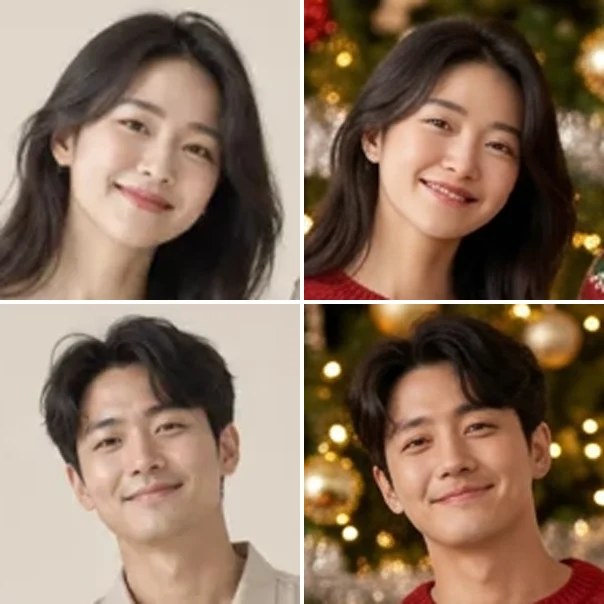 Left: original. Right: after the couples prompt. Her smile widened; his smile and jaw changed. Original: AI-generated. Result: a real Nano Banana 2.1 edit in PicOnTap, November 2026.
What these prompts can't do
- They can't promise identical faces. Every result is redrawn. Check faces before you print or send.
- They don't dress people for the weather. If you keep summer clothes, they stay summer clothes in the snow.
- Text is drawn by the model. Ours came out right, but check the spelling and position every time.
- We only tested AI-generated people. Real photos, babies and big groups can behave differently.
FAQ
Is it free to try?
Yes. Every visitor gets free daily credits without an account, and the editor shows the cost before each edit. In our test a Nano Banana 2.1 edit at 1K cost 2 credits. Paid plans are on the pricing page.
Which keeps faces better, ChatGPT or Gemini?
We didn't test the ChatGPT or Gemini apps. Inside PicOnTap, the same prompt scored 0.931 on GPT Image 2.6, an OpenAI model, and 0.857 on Nano Banana 2.1, a Google model. That was one run each, and both results were clearly the same man.
Can I use these prompts without a photo?
Yes, but the model will invent the people. To keep your own family's faces, upload a photo of them.
Is it safe to upload photos of my kids?
Uploaded photos and results are stored so the editor can run and you can keep working, and signed-in users can delete a work from My works. Whether a model provider may use images for training depends on that provider, and we don't make a blanket no-training promise. Read our privacy policy before you upload a photo of your children.
Can I print the result as a card?
Our 1K results came back 1,152 to 1,264 pixels wide, which is fine for phones and small prints. For a bigger card, choose 2K or 4K in the editor, which shows the price for each.
Does it work on my phone?
Yes. The editor runs in your mobile browser, so you can upload from your camera roll and save the result to your photos.
Bottom line
The best AI Christmas photo prompt is short and specific: the Christmas change first, then what must stay. Keep the "keep my face" line, but spend your effort on the photo: big, clear faces and one change at a time. Try a prompt on your own photo, and zoom in on the faces before you send the card.