GPT Image 2.6 vs 2.5 (2026): Is 2.6 Worse? Same-Photo Test
Is GPT Image 2.6 worse than 2.5? We ran the same three photo edits on both: similar consistency, fewer invented details on 2.6, 2.5x the cost.
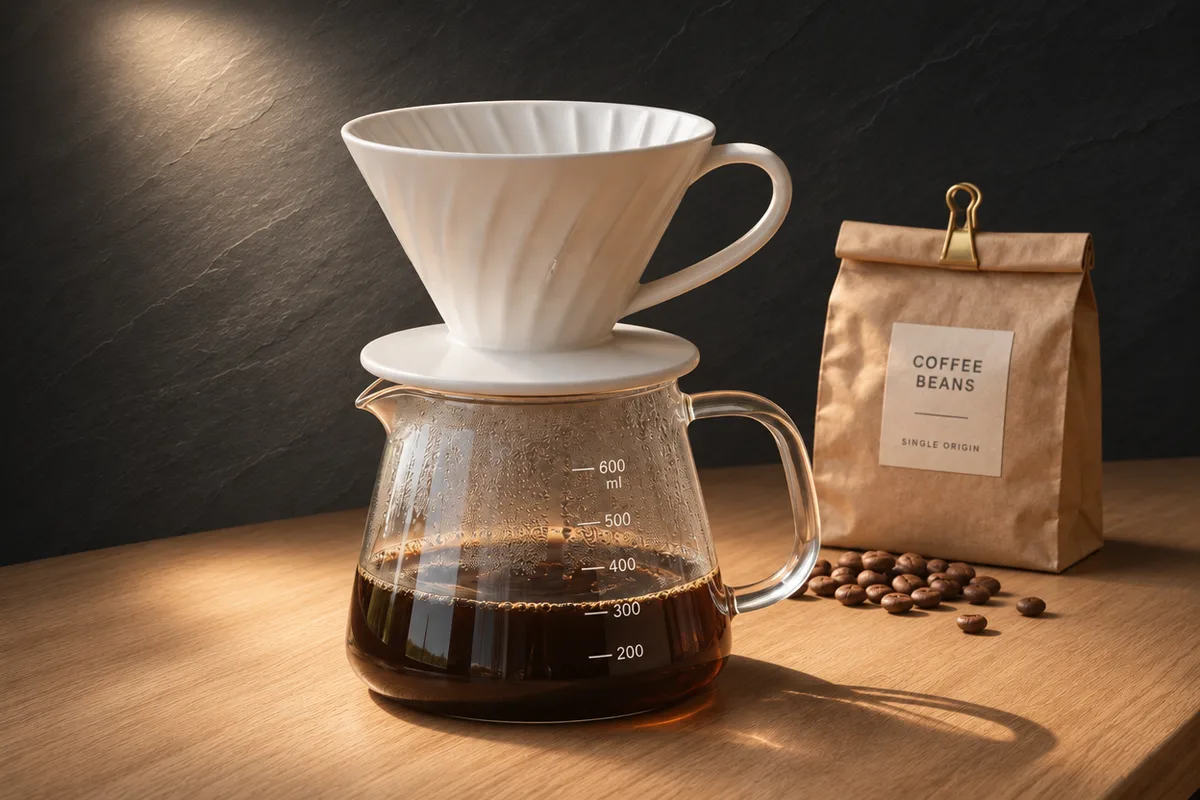
GPT Image 2.6 vs 2.5, in short: for photo editing, 2.6 is not worse than 2.5, but it is not clearly better either. In our three same-photo edits, both kept faces, labels and lighting about equally well, and 2.6 removed a sign without inventing anything where 2.5 added flowers. Each 2.6 edit cost about 2.5 times more and was not faster.
Want to judge it on your own photo? Open the GPT Image 2.6 online editor on PicOnTap, upload an image and write what should change and what should stay. A 1K edit costs 4 credits, and the editor shows the cost before you submit.
How we tested: on November 5, 2026 (US Eastern time) we sent the same three edit prompts to GPT Image 2.6 Sunburst and GPT Image 2.5 Sunburst at 1K, one run each, through the same API route the PicOnTap editor uses, then ran three more GPT Image 2.6 tasks in the PicOnTap editor itself. All originals are AI-generated. Specs, prices and leaderboard scores come from OpenAI, Arena, Rapidata and CellCog and were last checked on November 5, 2026.
TL;DR
- Is 2.6 worse than 2.5? Not for photo edits in our test. In the areas we asked to keep, both drifted from the original by almost the same amount (3.2 vs 3.1 on a 0–255 scale for the face).
- Where 2.6 did better: asked to remove a chalkboard sign, 2.6 rebuilt the crate behind it, while 2.5 added a crate of white flowers that was never there.
- Price: our 1K edits cost $0.037–$0.038 on 2.6 and $0.015 on 2.5 at the API. In PicOnTap that is 4 credits against 2.
- Speed: 2.6 Sunburst took 27–53 seconds per edit and 2.5 Sunburst 30–31. OpenAI's "50% faster" headline is best read as a Flare number.
- The leaderboards split: Rapidata's text-to-image board puts 2.6 Sunburst first, while Arena's single-image editing board still puts 2.5 Sunburst first.
- New in 2.6: animated GIF and SVG output, a complexity setting, and markup-guided edits in the API.
- Pick 2.6 for removals where nothing new may appear. Pick 2.5 for recolors, volume and tight budgets.
What is GPT Image 2.6?
GPT Image 2.6 is OpenAI's image generation and editing model, released on November 4, 2026 in ChatGPT, Codex and the API (OpenAI). It comes in two versions: Sunburst for detailed work and editing, and Flare for fast iteration. OpenAI says Images 2.6 generates images "50% faster than before," adds animated GIFs, and that Sunburst keeps images more consistent across edits at medium or high quality.
The launch lands on a large base: OpenAI says people now create 4 billion images per week across ChatGPT, Codex and the API.
What is GPT Image 2.5?
GPT Image 2.5 is OpenAI's previous image model, released on September 8, 2026 with the same Sunburst and Flare split (OmniaKey). As of November 5, 2026, OpenAI's own API model page still labels GPT Image 2.5 Sunburst as the "Default" and its "most capable model for image generation and editing" (OpenAI), while the 2.6 Sunburst page lists performance as "Not specified" (OpenAI).
Is GPT Image 2.6 worse than 2.5?
On launch day, a post on X saying 2.6 is "worse than 2.5" passed 89,000 views (X). Reddit threads add two complaints: the fine, grainy texture people associate with GPT Image is still visible, and some users report refusals for prompts they considered harmless (r/singularity, r/ChatGPT).
The leaderboards explain why people disagree, because they measure different things:
- Editing (Arena, single-image edit board, checked November 5, 2026): GPT-Image-2.5 Sunburst leads at 1517 ± 5. GPT-Image-2.6 Sunburst sits third at 1476 ± 10, from 3,833 votes, marked preliminary and labeled "Medium" (Arena).
- Text-to-image (Rapidata, checked November 5, 2026): GPT Image 2.6 Sunburst ranks first at 1316 ± 13, ahead of 2.5 Sunburst at 1221 ± 5 (Rapidata).
So "worse" is mostly an editing-board result, based on early votes at a medium setting. Our own photo edits below did not show 2.6 doing worse. They showed two models that keep untouched areas about equally well, with 2.6 more careful not to add things.
On the texture complaint: at 200% zoom, the eucalyptus leaves in our 2.6 images showed no obvious grain pattern. We did not test long chains of repeated edits, which is where Reddit users say the texture gets worse.
How we tested GPT Image 2.6 and 2.5
- Models and settings: GPT Image 2.6 Sunburst and GPT Image 2.5 Sunburst, 1K output, 3:2, medium quality. On 2.6, complexity was high, which is OpenAI's default.
- Originals: three photo-style scenes we generated with GPT Image 2.6 from text: a flower stall, a coffee dripper on a counter, and a woman reading by a rainy window. None shows a real person.
- Prompts: one English instruction per scene, identical for both models, naming the change and what must stay.
- Runs: one run per model per task, no retries. Cost is what the API reported; time runs from submission to finished image.
- Judging: we checked each result by eye against the prompt, then measured how far the "keep" areas moved: the average pixel difference from the original on a 0–255 scale, with both images resized to 1200×800. Lower is closer to the original, and values around 3–6 are invisible at normal size.
Test 1: Remove a chalkboard sign
Prompt: "Remove the chalkboard price sign and rebuild the wooden crate and flowers that were behind it. Keep every other flower, the awning and the light unchanged."
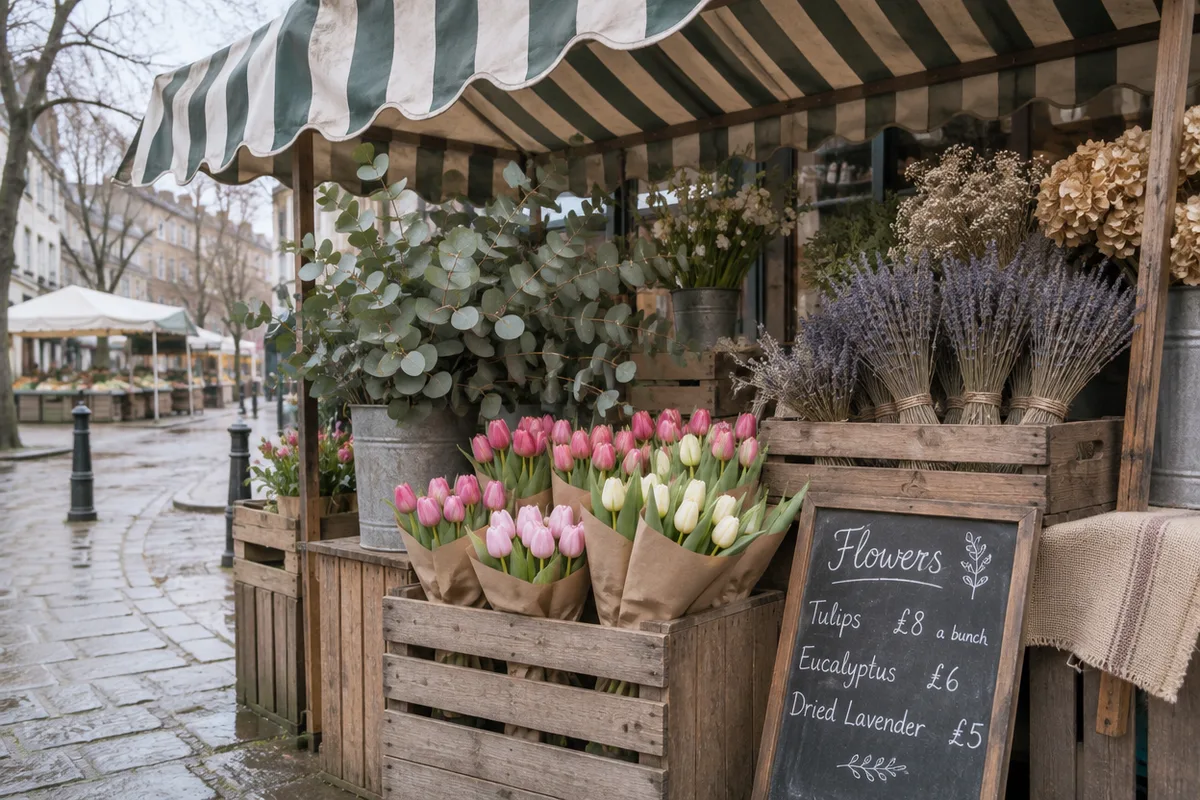 Original: AI-generated with GPT Image 2.6.
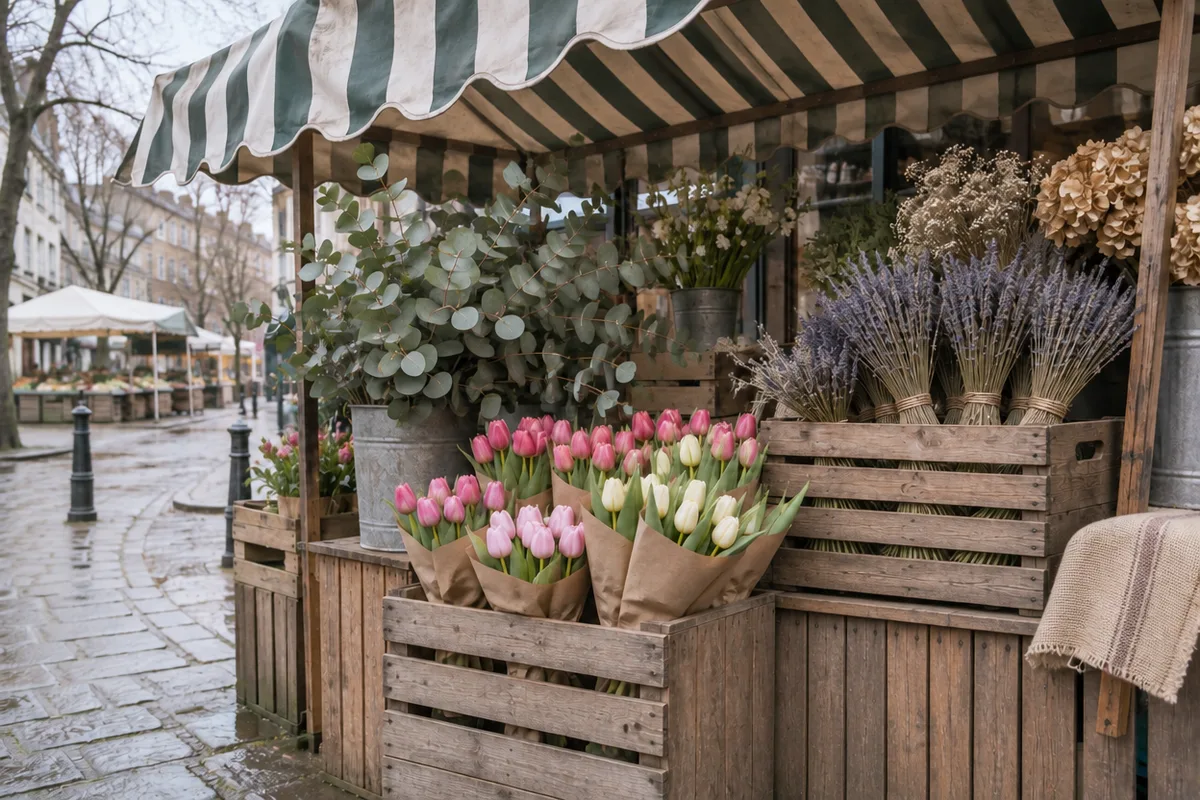 GPT Image 2.6 Sunburst: sign removed and the crate rebuilt. Real 1K edit, one run, November 5, 2026.
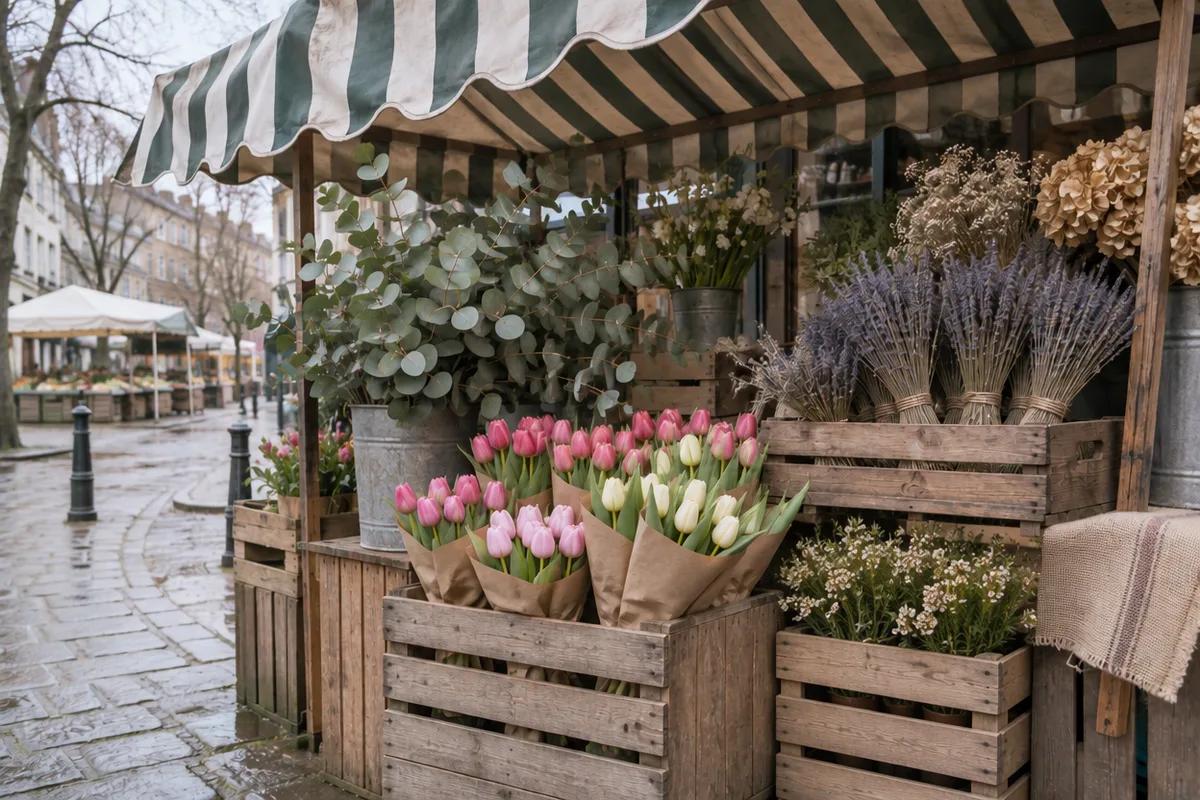 GPT Image 2.5 Sunburst: sign removed, but a new crate of white flowers appeared. Real 1K edit, one run, November 5, 2026.
- GPT Image 2.6: removed the sign and continued the lavender crate down to the ground. It also trimmed the edge of the burlap cloth on the right a little, which we did not ask for. 53 seconds, $0.038.
- GPT Image 2.5: removed the sign but filled the gap with a crate of small white flowers that was not in the original. Our prompt mentioned "flowers that were behind it," and 2.5 read that as permission to add new ones. 30 seconds, $0.015.
- Everything else: both left the tulips, eucalyptus and awning almost untouched (drift 6.5 vs 6.0 on the flowers, 3.7 vs 3.9 on the awning).
- Verdict: GPT Image 2.6. When you remove something, the gap should be rebuilt from what was already there.
Test 2: Replace the background behind a product
Prompt: "Replace the window and background with a dark slate wall lit by one soft spotlight. Keep the dripper, the glass server, the coffee bag and the oak counter exactly as they are, with believable contact shadows."
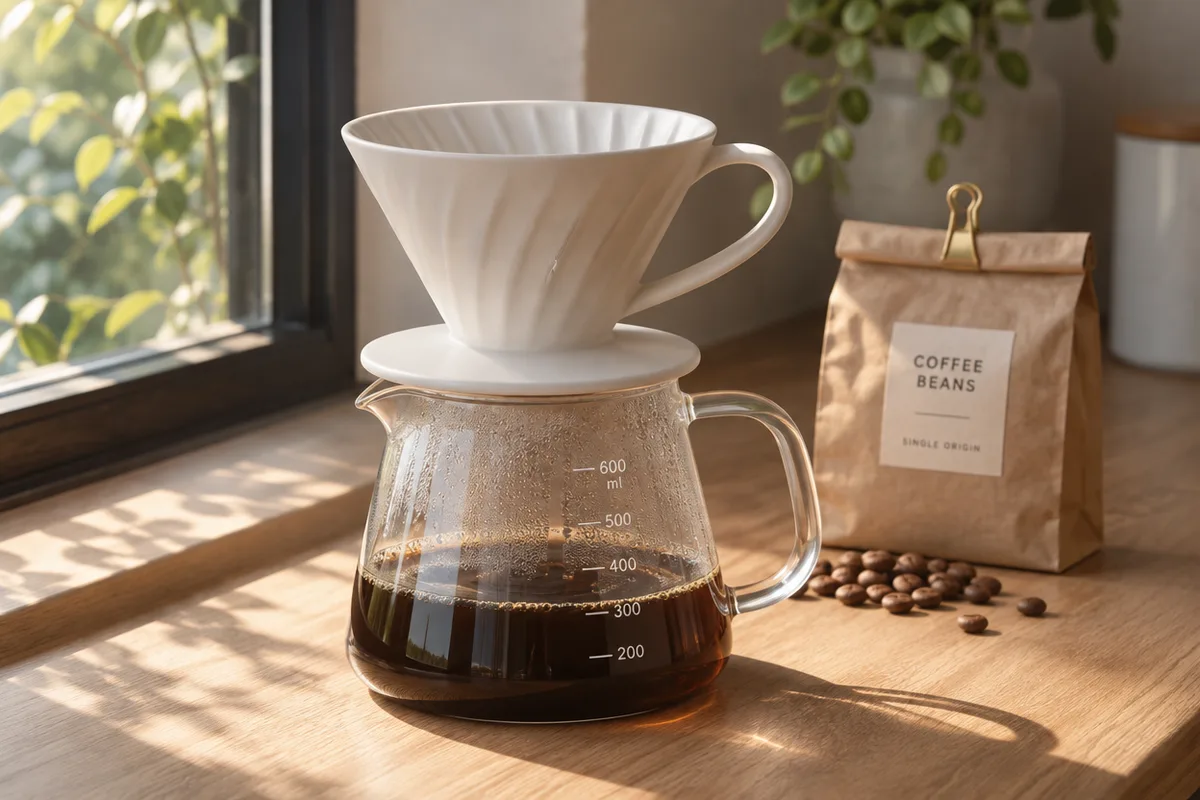 Original: AI-generated with GPT Image 2.6.
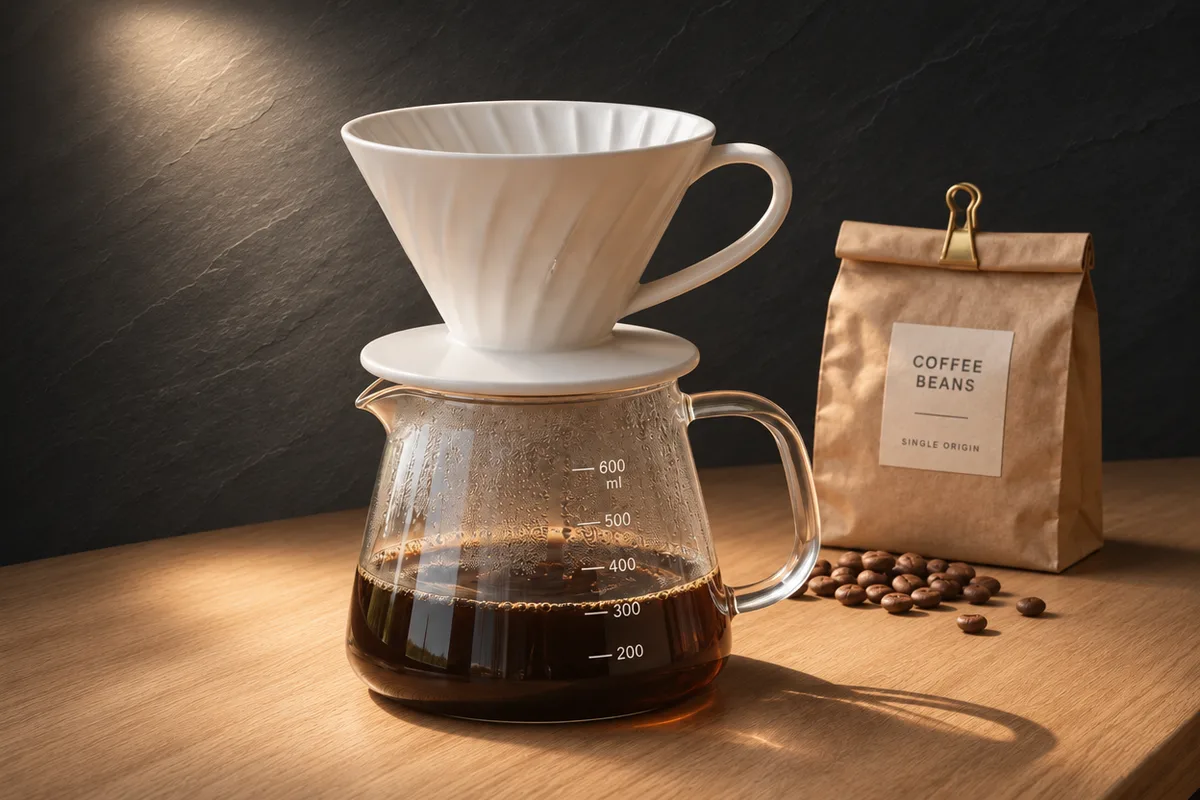 GPT Image 2.6 Sunburst: slate texture and a spotlight, label and scale kept. Real 1K edit, one run, November 5, 2026.
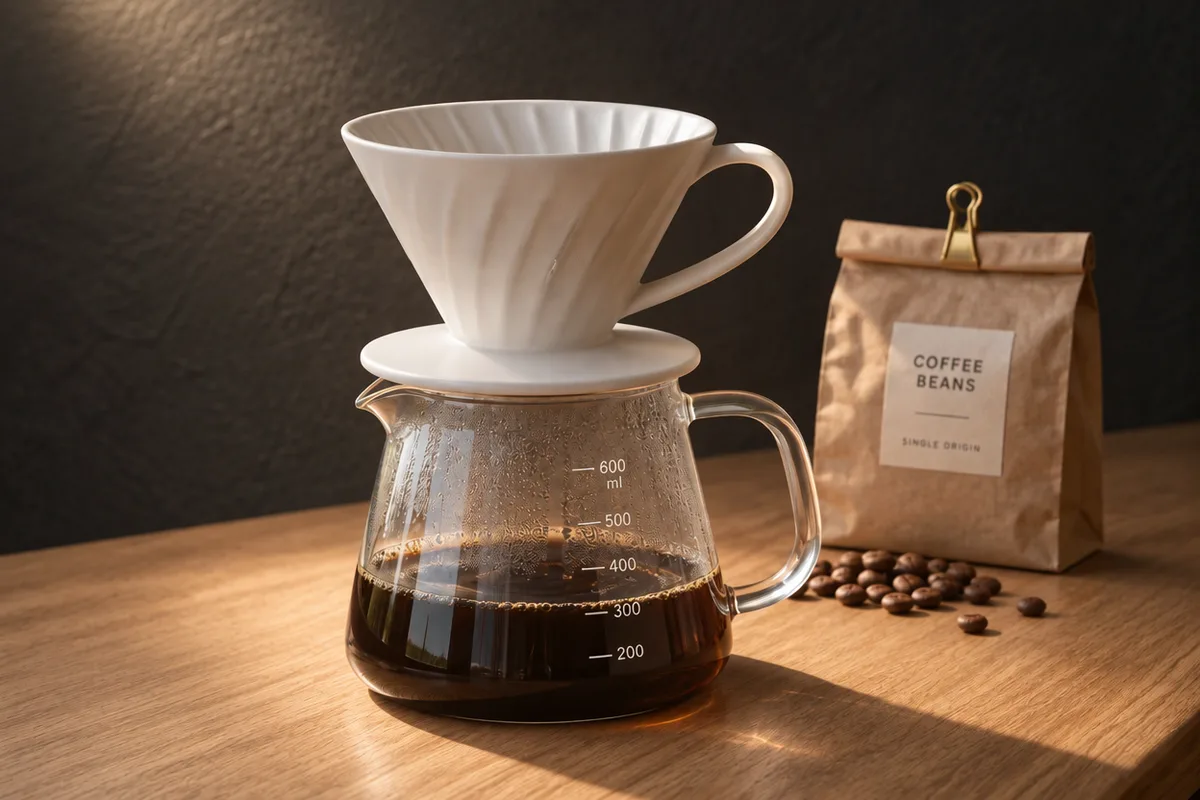 GPT Image 2.5 Sunburst: label and scale kept, the wall reads more like dark plaster. Real 1K edit, one run, November 5, 2026.
- GPT Image 2.6: drew a textured slate wall with a visible spotlight. The 200–600 ml scale, the "COFFEE BEANS / SINGLE ORIGIN" label and the loose beans stayed in place. 39 seconds, $0.038.
- GPT Image 2.5: also kept the scale, the label and the beans. Its wall looks more like smooth dark plaster than slate. 30 seconds, $0.015.
- Everything else: the new light changes how the objects look, so both moved more here. 2.6 moved the coffee bag and beans slightly less (13.6 vs 16.7 and 12.8 vs 17.8).
- Verdict: a small edge to GPT Image 2.6 for following the word "slate." Both results are usable product shots.
Test 3: Recolor a sweater on a person
Prompt: "Change only the sweater to deep forest green, keeping its cable-knit texture. Keep her face, hair, pose, the book and the rainy window unchanged."
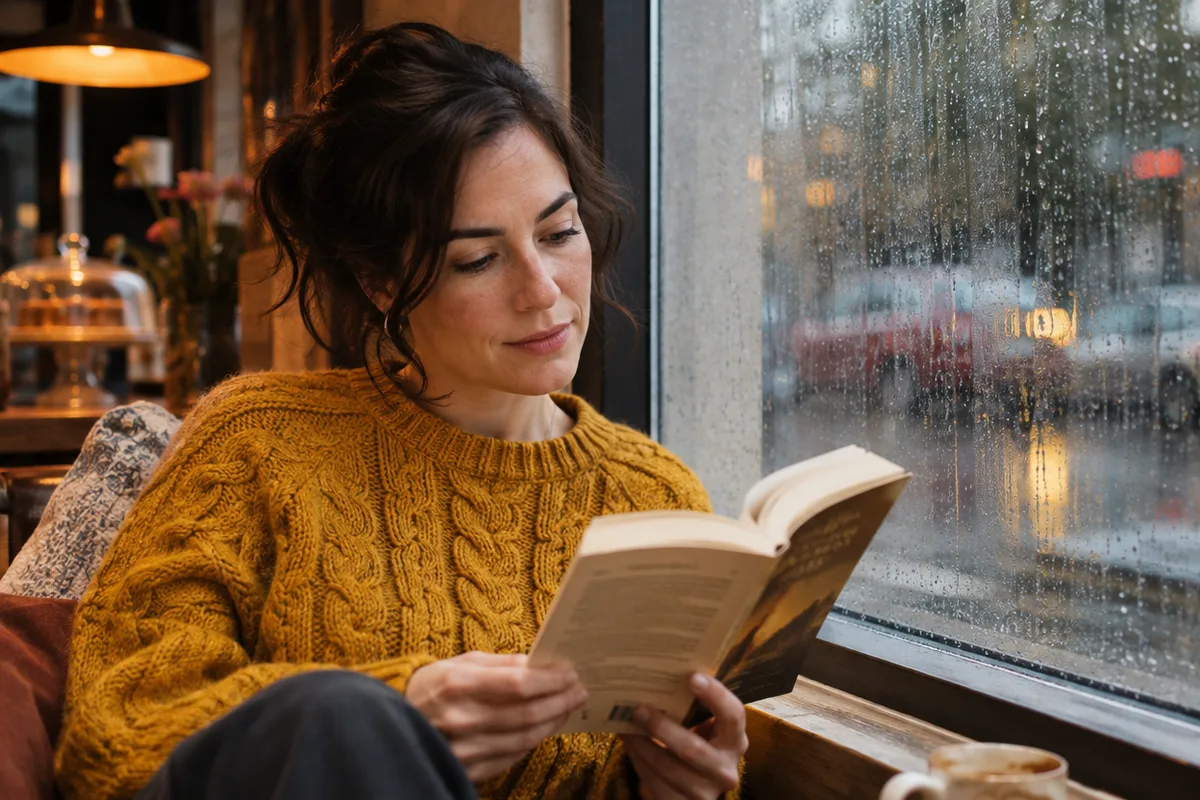 Original: AI-generated with GPT Image 2.6, not a real person.
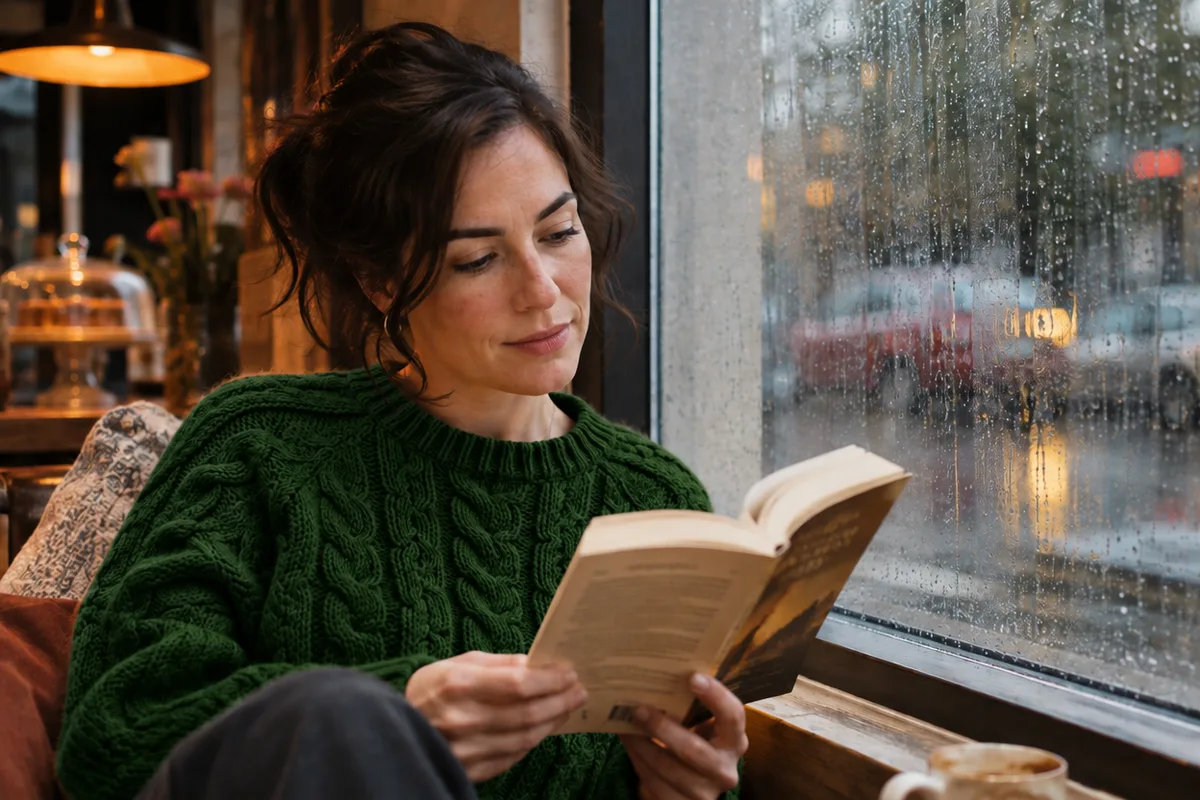 GPT Image 2.6 Sunburst: sweater recolored, face and book unchanged. Real 1K edit, one run, November 5, 2026.
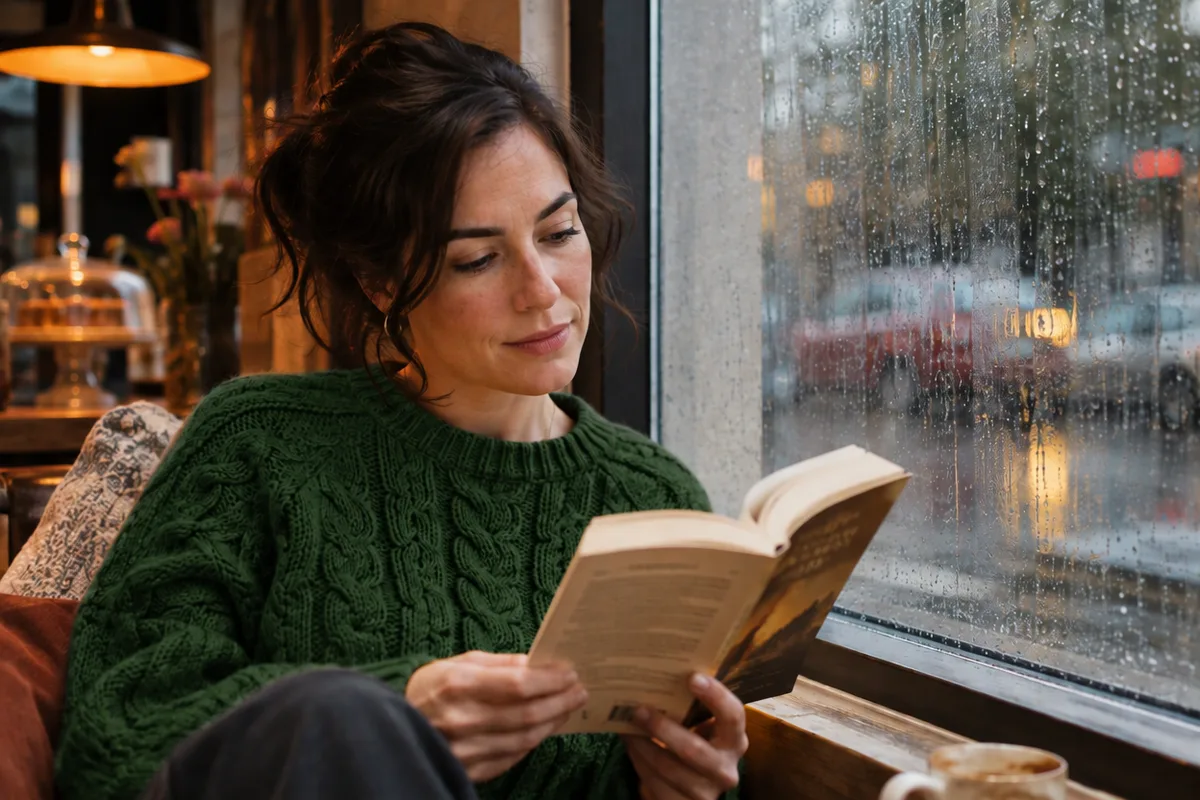 GPT Image 2.5 Sunburst: the same result at 40 percent of the API cost. Real 1K edit, one run, November 5, 2026.
- GPT Image 2.6: green sweater, cable knit kept, face, book and window unchanged. 27 seconds, $0.038.
- GPT Image 2.5: the same. 31 seconds, $0.015.
- Everything else: the face moved by 3.2 on 2.6 and 3.1 on 2.5, and the window by 6.2 and 6.1. At 200% zoom we could not tell the two faces apart.
- Verdict: a tie. GPT Image 2.5 did the same job for 40% of the price.
Test 4: Edit only a selected area in the PicOnTap editor
In the PicOnTap editor we brushed over the front tulip bunches in the flower-stall photo and asked GPT Image 2.6: "Change only the tulips in the selected area to bright orange. Keep the paper wrapping, the crates and everything else unchanged."
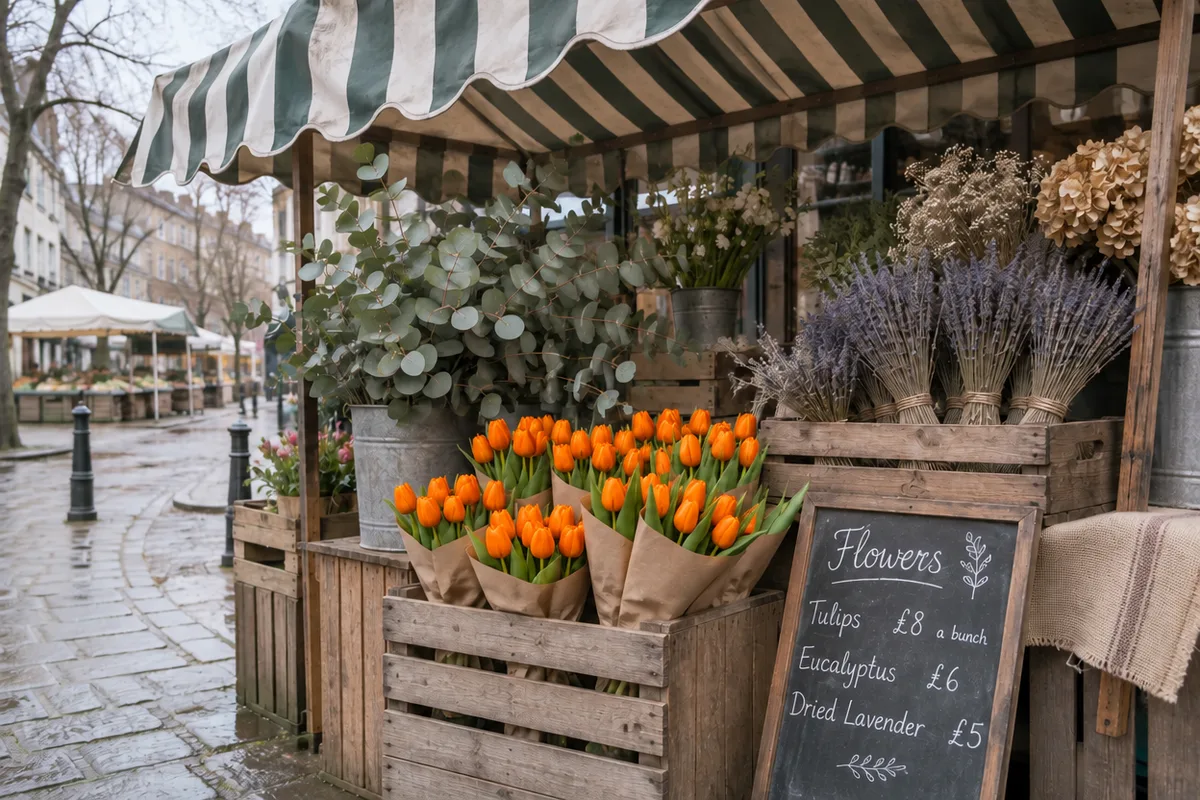 GPT Image 2.6 in the PicOnTap editor with a brushed selection over the front tulips. Real 1K edit, 4 credits, November 5, 2026.
- Result: every tulip inside the selection turned orange. The pink tulips in the planter behind, outside the selection, stayed pink, and the chalkboard prices were unchanged.
- What the selection does not do: outside the selection the image still moved by 6.4 on our scale, about the same as an edit without a selection. That is invisible at normal size, but it shows the model redraws the whole frame rather than pasting the original pixels back.
- Time and cost: 67 seconds and 4 credits. Two more GPT Image 2.6 runs in the editor, a sign removal and a text-to-image bakery scene, took 46 and 37 seconds and were also charged 4 credits each. The removal kept the photo's original 3:2 shape.
Results of our GPT Image 2.6 vs 2.5 test
- GPT Image 2.6: met our criteria in 3 of 3 same-photo tests, with one small unrequested change to the cloth in Test 1, and in the selection test.
- GPT Image 2.5: met them in 2 of 3. It added content in Test 1.
- Cost per 1K edit at the API: $0.037–$0.038 for 2.6 against $0.015 for 2.5, about 2.5 times more.
- Time per edit: 27–53 seconds for 2.6 Sunburst against 30–31 seconds for 2.5 Sunburst.
- Limits: one run per model per task, three scenes, AI-generated originals, and no real photos of people. Results can vary between runs.
GPT Image 2.6 vs 2.5: side-by-side comparison
How much does each model cost per image?
OpenAI charges the same token rates for both models: $8 per million image input tokens and $30 per million image output tokens (OpenAI pricing, checked November 5, 2026). The bill per image still differs. CellCog measured 2.6 using 4.2 times the output tokens of 2.5 at low quality and 3.3 times at medium, with identical counts at high and above, and found no half-price Batch rate for 2.6 yet (CellCog). In our 1K edits at medium quality, 2.6 cost $0.037–$0.038 per image against $0.015 for 2.5. In PicOnTap, a 1K edit costs 4 credits on GPT Image 2.6 and 2 credits on GPT Image 2.5.
Which model is faster?
OpenAI says Images 2.6 is 50% faster and that Flare can return an image in as little as six seconds at low quality. CellCog found 2.6 Flare about twice as fast as 2.5 Flare, but 2.6 Sunburst 17–27% slower than 2.5 Sunburst. Our Sunburst edits fit that pattern: 27–53 seconds on 2.6 against 30–31 on 2.5, one run each.
Which keeps the rest of the image intact?
OpenAI's claim for 2.6 Sunburst is "even greater image consistency across edits." In our three tests, the two models kept untouched areas almost identically: the face drifted 3.2 vs 3.1, the awning 3.7 vs 3.9. The difference we saw was not in what each model kept, but in what 2.5 added. CellCog's three-step edit chain found 2.6 kept one detail, a hoodie stripe, slightly more faithfully.
What can GPT Image 2.6 do that 2.5 cannot?
- Animated GIFs: made from a prompt in ChatGPT and through the API. OpenAI's guide lists 2–64 frames, but CellCog found the API accepted only 2–16.
- SVG files: vector output through the generations endpoint. CellCog needed an extra svg.model parameter and saw 14 of 15 launch-night SVG requests fail.
- Complexity setting: low, medium or high planning before rendering. High is the default and has no separate fee, and OpenAI recommends low complexity for most editing tasks (OpenAI guide).
- Markup in the API: drawing on an image to show where to edit, already in ChatGPT, now comes to the API. CellCog found it also works on GPT Image 2.5.
Where can you use each model?
OpenAI says Images 2.6 is available in ChatGPT and Codex across all subscription tiers, on desktop, mobile and web, and that both 2.6 models are in the API. GPT Image 2.5 remains available in the API.
PicOnTap is a browser-based AI image editor: upload a photo and describe the change in a sentence to remove objects, replace backgrounds, recolor details or restore old photos. It runs GPT Image 2.6 Sunburst at 1K for photo edits and for images made from text, alongside GPT Image 2.5.
Which should you choose?
- Removing objects or text where nothing new may appear: GPT Image 2.6. It was the only one that did not invent content in our test.
- Background swaps for product photos: either. Both kept the label and the scale; 2.6 followed the material you name more literally.
- Recoloring clothes or small changes on a person: GPT Image 2.5 gave the same result for less.
- High volume through the API: GPT Image 2.5, or 2.6 at high quality and above, where token counts match. At low and medium quality, 2.6 costs three to four times more per image.
- Animated GIFs or SVG files: GPT Image 2.6. GPT Image 2.5 does not output them.
- Speed: GPT Image 2.6 Flare. Sunburst 2.6 was not faster in our runs or in CellCog's.
To try a removal or a selection edit on your own photo, use the GPT Image 2.6 online editor. For a cheaper recolor, the GPT Image 2.5 editor costs 2 credits per 1K edit.
FAQ
Is GPT Image 2.6 better than GPT Image 2.5?
For text-to-image, Rapidata's human-preference board ranks 2.6 Sunburst higher (1316 against 1221). For photo editing, Arena's early votes still favor 2.5 Sunburst, and in our three same-photo edits the two were close, with 2.6 better at removals.
Is GPT Image 2.6 free?
OpenAI says Images 2.6 is in ChatGPT across all subscription tiers. In the API you pay per token. In PicOnTap, a 1K edit with GPT Image 2.6 costs 4 credits, and new accounts receive 6 credits after verification, valid for 7 days.
What is the difference between Sunburst and Flare?
Sunburst is built for detailed work and editing, Flare for fast iteration. OpenAI says Flare can generate an image in as little as six seconds at low quality and improves layouts for posters and product images.
Does GPT Image 2.6 cost more than 2.5?
Per token, no: both cost $8 and $30 per million image input and output tokens. Per image, yes below high quality: CellCog measured 3.3 to 4.2 times the tokens at medium and low, and our 1K edits cost $0.037–$0.038 against $0.015.
Can GPT Image 2.6 make GIFs?
Yes. ChatGPT makes them from a prompt or an image, and the API makes them through the generations endpoint, not the edits endpoint. CellCog found the API capped GIFs at 16 frames.
Is GPT Image 2.5 still available?
Yes. GPT Image 2.5 Sunburst and Flare remain in OpenAI's API, and on November 5, 2026 the 2.5 Sunburst model page still carried the "Default" label. PicOnTap still offers GPT Image 2.5 at 2 credits per 1K edit.
Is GPT Image 2.6 the same as MAI-Image-2.6?
No. MAI-Image-2.6 is an image model from Microsoft (OpenRouter), while GPT Image 2.6 is OpenAI's. The similar version numbers are a coincidence, and the two often appear together in comparison searches.
Conclusion
GPT Image 2.6 is a sensible upgrade for edits where the model must not add anything, and the only choice of the two for GIF or SVG output. For everyday photo edits it is not a quality leap, and in our test it cost about 2.5 times more per 1K edit without being faster. If your edits are recolors or simple background swaps, GPT Image 2.5 still does the job. The fastest way to decide is to run your own photo: start in the GPT Image 2.6 online editor and compare the result with 2.5.
Sources
- OpenAI: Introducing Images 2.6 (November 4, 2026; read November 5, 2026)
- OpenAI: GPT-Image-2.6 Sunburst model page (checked November 5, 2026)
- OpenAI: GPT-Image-2.5 Sunburst model page (checked November 5, 2026)
- OpenAI: API pricing (checked November 5, 2026)
- OpenAI: Image generation guide (checked November 5, 2026)
- Arena: single-image edit leaderboard (checked November 5, 2026)
- Rapidata: text-to-image leaderboard (checked November 5, 2026)
- CellCog: GPT Image 2.6 vs 2.5 (November 5, 2026)
- OmniaKey: GPT Image 2.6 vs GPT Image 2.5 (updated November 5, 2026)
- OpenRouter: MAI-Image-2.6 vs GPT Image 2.5 Sunburst (checked November 5, 2026)
- Reddit r/singularity: Try out GPT image 2.6 and report back (November 4, 2026)
- Reddit r/ChatGPT: Introducing Images 2.6 (November 4, 2026)
- X post by @synthwavedd (November 4, 2026)
- PicOnTap hands-on test: 6 same-photo API edits and 3 editor tasks, November 5, 2026