Canva vs Pixlr vs PicOnTap (2026): Which Should You Use?
Canva vs Pixlr compared on photo editing, AI limits, templates and real cost per edit, plus when a prompt-first editor like PicOnTap fits better.
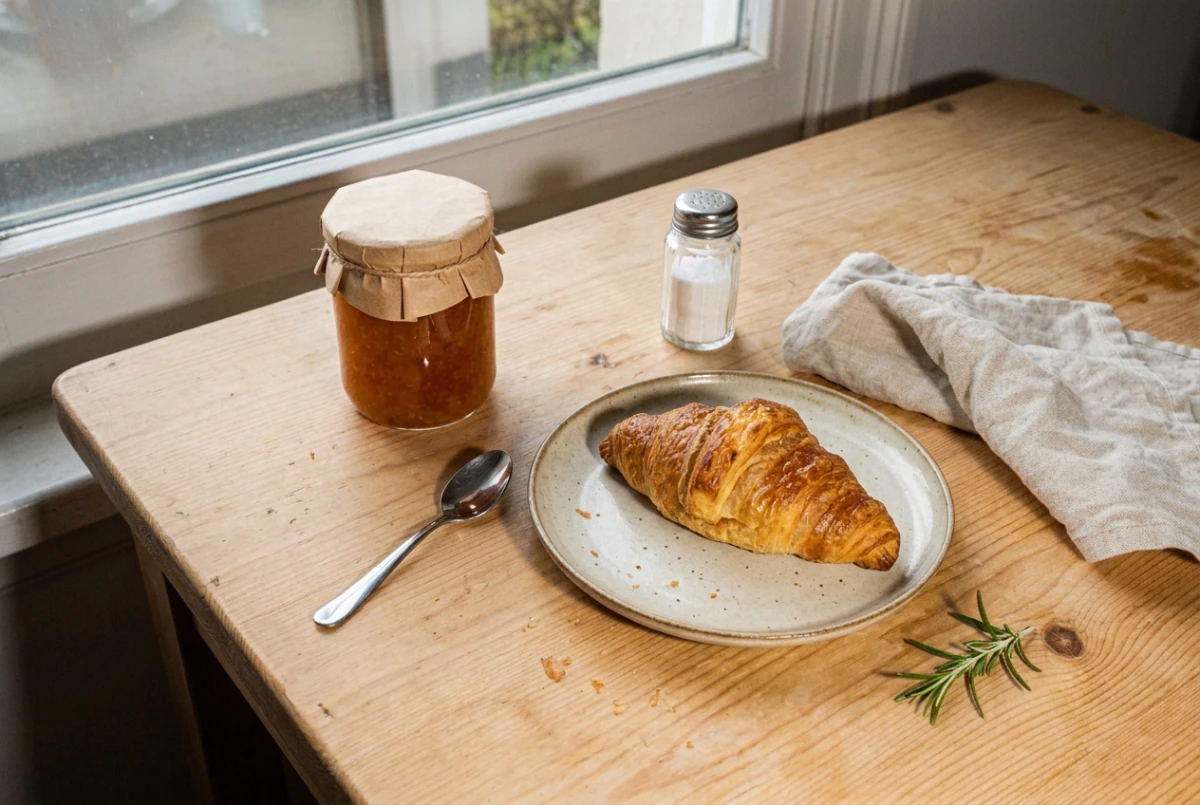
Canva vs Pixlr, in short: choose Canva when the finished thing is a design, such as a post, slide deck or flyer built from a template. Choose Pixlr when the job is hands-on photo editing at a lower price. If you only want to describe one change to one photo, a prompt-first editor is the shorter path.
To try that route on your own photo, PicOnTap's free AI image editor needs no sign-up and adds no watermark.
How we put this together: Canva and Pixlr plans, limits and features come from their own pricing, feature and help pages, last checked on November 4, 2026, in US dollars from a US connection. User reports come from public Reddit threads and are anecdotes, not measurements. We did not run a side-by-side edit test, so this article makes no claim about which tool produces better images. The one example shown is a real PicOnTap edit.
TL;DR
- Best for designs and teams: Canva, with 1.6M+ templates on its free plan and collaboration on Business.
- Best for manual photo work: Pixlr, which describes its editor as comparable to desktop software like Photoshop.
- Lowest cost per AI edit: Pixlr. Premium works out to about $0.01 per "fast" edit on Pixlr's own estimate.
- Hardest AI cost to predict: Canva. It publishes multipliers such as "10x more AI than Canva Free", not a number of edits.
- Shortest path for a single photo: PicOnTap. Upload, write a sentence, run it on GPT Image 2.5 or Nano Banana 2.1, and see the cost before you submit.
What are Canva, Pixlr and PicOnTap?
Canva is an online design platform built around templates. Its plan page leads with a drag-and-drop editor, 1,000+ design types and a stock library, with AI tools added on top.
Pixlr is a browser photo editor and AI generator with Express and Editor products. It also offers image, video and audio generation through models such as Flux, Kling and Veo.
PicOnTap is a browser-based AI image editor: upload a photo and describe the change in a sentence to remove objects, replace backgrounds, recolor details or restore old photos. Each edit runs on a model you pick by name, including GPT Image 2.5, Nano Banana 2.1 and Seedream 5.0 Pro. Guests can use them too, with no sign-in.
The three overlap less than most comparison pages suggest. Canva starts from a layout, Pixlr starts from an image and a toolbar, and PicOnTap starts from a photo and a sentence.
Canva vs Pixlr, feature by feature
Is Canva any good for photo editing?
Yes, for quick edits inside a design. Canva's photo editor offers Auto-adjust, separate foreground and background adjustments, Magic Eraser, a Background Generator driven by a text prompt, and object selection that lets you recolor, replace, move or remove an element. The photo is usually a step toward a finished design, and that is where Canva pays off.
Is Pixlr good for photo editing?
Yes, and it goes further into manual control. Pixlr says its editor is designed to offer an experience comparable to desktop software like Photoshop, and independent reviews describe Pixlr E as its layer-based editor. Its AI list includes Generative Fill, Generative Expand, object removal, background removal and upscaling up to 25 megapixels.
Which one can edit a photo from a written prompt?
All three now can, in different ways:
- Canva: prompt tools such as Background Generator and conversational editing with Canva AI 2.0, both inside the design workspace.
- Pixlr: an Instruct Editor, currently presented as a chat-based Nano Banana editor with many preset styles.
- PicOnTap: the prompt box is the main screen. You can paint an area when only one part should change, then compare versions.
Templates, stock and design assets
Canva wins clearly. Its free plan lists 1.6M+ templates and 4.7M+ photos, videos, graphics and audio. Pro raises that to 3.6M+ templates and 141M+ premium assets. Pixlr's Premium plan mentions a "big library" of fonts, templates and elements without a count. One Reddit post favoring Pixlr for book covers still concedes that Canva has far more graphics and vectors.
Collaboration and brand tools
Canva wins again. Its plans list 1 Brand Kit on Free, 5 on Pro and 100 with approvals on Business, plus team admin tools. Pixlr's plan cards focus on credits, ads, saves and generation speed, and its FAQ mentions an Enterprise plan for larger organizations.
Devices
All three work in a browser. Pixlr says it runs on web browsers, iOS and Android, and a paid plan carries across web, desktop and mobile. Canva lists web, desktop and mobile use on its feature pages. PicOnTap runs in the browser on a computer, tablet or phone with nothing to install.
Is Pixlr free anymore?
Partly. Pixlr's homepage says its tools are "100% free", and its FAQ says the free version works without an account. The same FAQ points people who want AI-powered tools and an ad-free experience to paid plans, and the Plus plan sells "Ad-Free" and "Unlimited saves".
That matches what users report. A 2023 r/pixlr thread is full of people upset about the move away from free use. A November 2026 review reports a daily save cap and 20 AI credits for new users, and notes that Pixlr does not publish the cap on its pricing page. We could not confirm those two numbers on Pixlr's own pages, so treat them as reported.
What are the drawbacks of Canva?
For AI-heavy photo work, the main one is an allowance you cannot easily plan around. Canva's help page says its AI tools share a monthly allowance, that complex tasks use more of it, and that Free has "limited access". It gives no fixed number of edits per plan.
Users notice. In an r/canva thread started in January 2026, a Pro subscriber says they reached 90% of the limit in under ten tasks while trying to change hair color on a drawing. Another Pro user hit the limit three days in after expecting 500 images. An April 2026 commenter says Canva does not show what each action costs, though the help page does now describe a usage tracker under Billing.
Canva says Pro users who reach the limit can upgrade or keep using AI tools with short pauses, though its Ultra AI tools stop until the monthly reset. Its optional AI Pass add-on costs $100 per person per month. None of this matters much if you use Canva mainly for layouts, where template and design tools do most of the work.
How much does one AI edit cost on each tool?
Here is our arithmetic from each company's published plan numbers, using monthly billing first and yearly billing in brackets. The per-edit figures are our own calculations, and they rely on each vendor's estimate.
- Pixlr Plus: $2.49 a month for 80 credits, estimated at about 80 fast AI edits. About $0.03 per fast edit ($1.99 yearly: about $0.025).
- Pixlr Premium: $9.99 a month for 1,000 credits, estimated at about 1,000 fast edits. About $0.01 per fast edit ($7.99 yearly: about $0.008).
- PicOnTap Lite: $6.80 billed monthly for 200 credits, estimated at about 100 edits at 1K. About $0.07 per edit ($60 billed yearly: $0.05).
- PicOnTap Pro: $13.60 billed monthly for 450 credits, about 225 edits at 1K. About $0.06 per edit ($120 billed yearly: about $0.044).
- PicOnTap Ultra: $34 billed monthly for 1,400 credits, about 700 edits at 1K. About $0.05 per edit ($300 billed yearly: about $0.036).
- Canva Pro: US$144 a year, or $12 a month averaged, with no published per-edit number.
Pixlr is the cheapest of the three by a wide margin on this measure. The figures are not like for like, though. Pixlr's pricing page does not name the model behind a "fast" edit, and its "pro" images cost five times the credits of fast ones. Pixlr lists access to all its models from Premium up. PicOnTap's estimate is for a 1K edit: GPT Image 2.5 and Nano Banana 2.1 both cost 2 credits at that size, for guests and on every plan. The pricing page and the editor show the actual cost before you submit, which varies by model and resolution. Price says nothing about result quality.
Why do comparison pages disagree on prices?
Because many of them are out of date or use a different billing term. On November 4, 2026, the same Canva Pro plan appeared at $6.50 on one top-ranking comparison, $12.95 on a software directory, and $15 on another directory and in Google's AI Overview. Canva's own page showed US$144 a year on its yearly view.
The same comparison that lists $6.50 also gives Pixlr a $1.49 starting price and Canva 250,000+ free templates. Pixlr's page starts at $1.99 on yearly billing, and Canva's page lists 1.6M+ free templates. Canva's prices can also vary by date, term and location, so check the Canva and Pixlr plan pages before you buy. Also note Pixlr's FAQ says it cannot refund a subscription once payment has been processed.
What does a prompt-first edit look like?
This is one real edit in PicOnTap, using Nano Banana 2.1 at 1K for 2 credits. The prompt: "Replace the harsh camera flash with soft, diffused morning light from the window and remove the hard flash shadows. Keep the croissant, the jam jar and its paper lid, the salt shaker, the spoon, the napkin and the rosemary unchanged in shape and position."
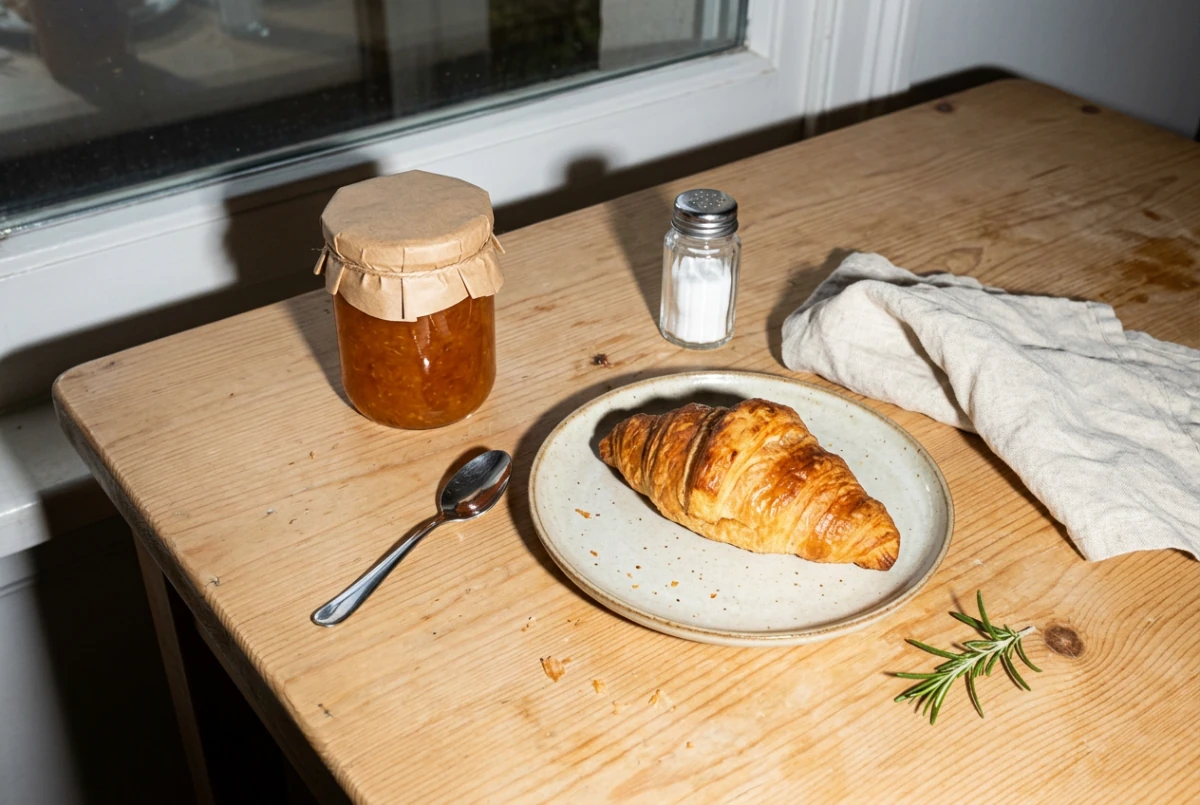 Original: AI-generated.
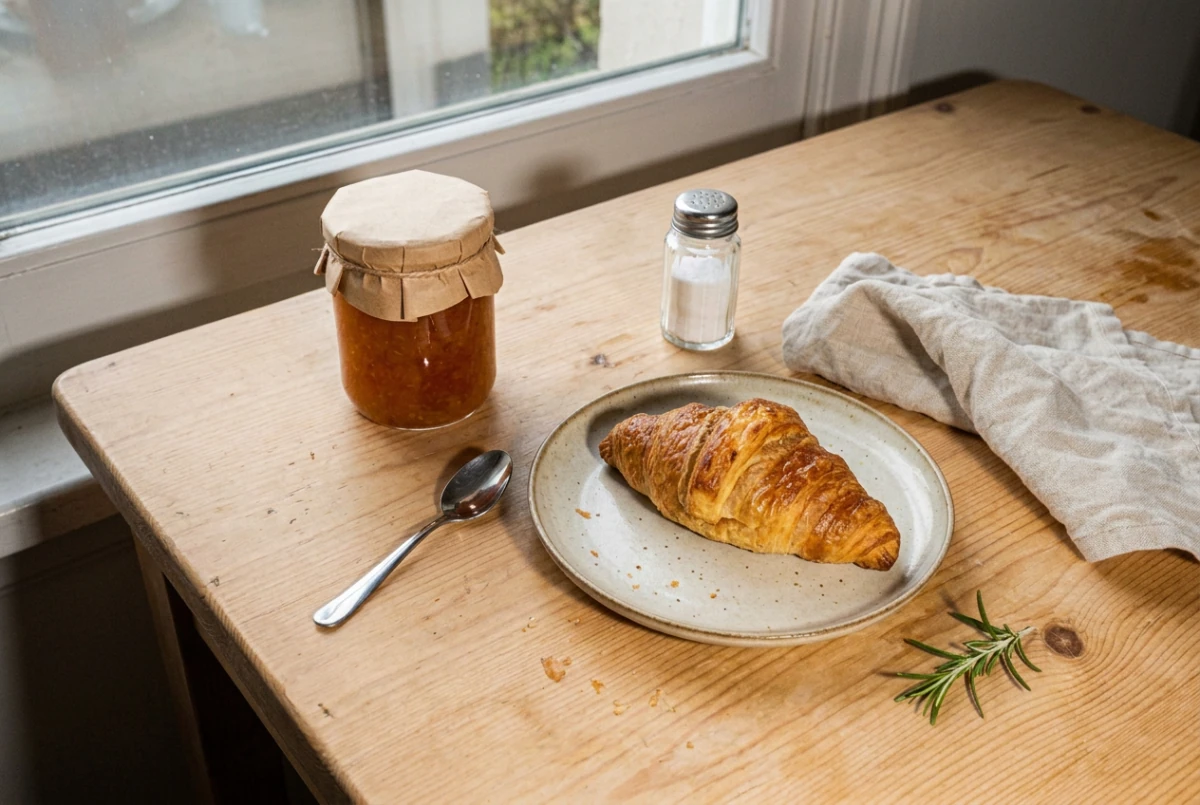 Result: a real Nano Banana 2.1 edit in PicOnTap, October 12, 2026.
The objects stayed where they were and the flash shadows went. The view through the window and small details such as the salt level also changed, so compare any result against your original before you use it. For context, Google's model card scores Nano Banana 2.1 at 1026 with thinking and 980 without for general editing in side-by-side human ratings, against 939 for Nano Banana Pro. Those are Google's own evaluations, so test on your own photos. This example shows the workflow on one AI-generated image, not how PicOnTap ranks against Canva or Pixlr.
Which should you choose?
- Choose Canva if you are making social posts, presentations, flyers or anything that needs templates, brand kits and shared editing.
- Choose Pixlr if you want Photoshop-style control in a browser, or you run a high volume of low-cost AI edits and generations.
- Choose PicOnTap if you have a photo, know the change you want, and would rather write one sentence than learn a toolbar, with GPT Image 2.5 or Nano Banana 2.1 doing the work. Start with the free AI image editor: guests get free daily credits, and failed edits caused by a technical error return their credits. Free edits can wait briefly before starting, and free use depends on your region.
- Use more than one if your work crosses over. One workable pattern is to fix the photo in an editor, then place it in a Canva layout.
FAQ
Which is better, Canva or Pixlr?
Neither wins overall. Canva is better for templates, design and teamwork, and Pixlr is better for manual photo editing and low-cost AI credits.
Is there a better option than Canva?
For layouts and team design, Canva is hard to replace. For photo-only work, a dedicated editor such as Pixlr or PicOnTap fits the job more directly.
Why don't professional designers use Canva?
We have no measured data on this, so here is a judgment: Canva is fast for layouts, while complex print, vector and pixel work often needs more precise tools. Canva itself now lists access to Affinity on its plans.
What is the #1 photo editing app?
There is no single answer, because it depends on the job. Pick by task: templates point to Canva, manual control to Pixlr, and single-sentence edits to a prompt-first editor.
Is Canva or Pixlr easier for beginners?
For a design, usually Canva, because you start from a template in a drag-and-drop editor. For a photo, Pixlr Express is its simpler route for quick edits.
Does Canva or Pixlr need an account?
Pixlr's FAQ says its free version works without an account. Canva's site directs you to sign up or log in. PicOnTap lets guests edit and download without signing up.
Does PicOnTap add a watermark?
No. The PicOnTap homepage states no watermark and a full-size download.
The bottom line
Canva vs Pixlr is less a contest than a choice of starting point: a layout or a photo. Canva suits people shipping designs, and Pixlr suits people who want control and cheap credits. If your starting point is one photo and one clear change, try it in the free AI image editor and judge the result yourself.
Sources
- Canva plans and pricing (checked November 4, 2026)
- Canva Help: Understanding your AI usage (checked November 4, 2026)
- Canva Help: Understanding AI Pass (checked November 4, 2026)
- Canva photo editor (checked November 4, 2026)
- Canva Magic Eraser (checked November 4, 2026)
- Pixlr homepage and FAQ (checked November 4, 2026)
- Pixlr pricing and FAQ (checked November 4, 2026)
- Pixlr Instruct Editor (checked November 4, 2026)
- AI Tools Police: Pixlr review (checked November 4, 2026)
- r/pixlr: The great advantage of free is gone (February 2023)
- r/WattpadCovers: Why Pixlr is a better cover creation tool than Canva (June 2025)
- r/canva: Canva AI usage limit (January 2026)
- r/canva: Reached AI image usage prematurely (December 2025)
- r/canva: Run out of AI credits (April 2026)
- Fahim AI: Canva vs Pixlr, Capterra and TrustRadius (third-party prices quoted above, checked November 4, 2026)
- Google DeepMind: Nano Banana 2.1 model card (checked November 4, 2026)
- PicOnTap pricing and model pages for GPT Image 2.5 and Nano Banana 2.1 (checked November 4, 2026)