Paws at You Meme: How to Make It + Template & Captions
Make the snow leopard paws at you meme with your own pet: an original template, a tested prompt and 40 caption ideas.
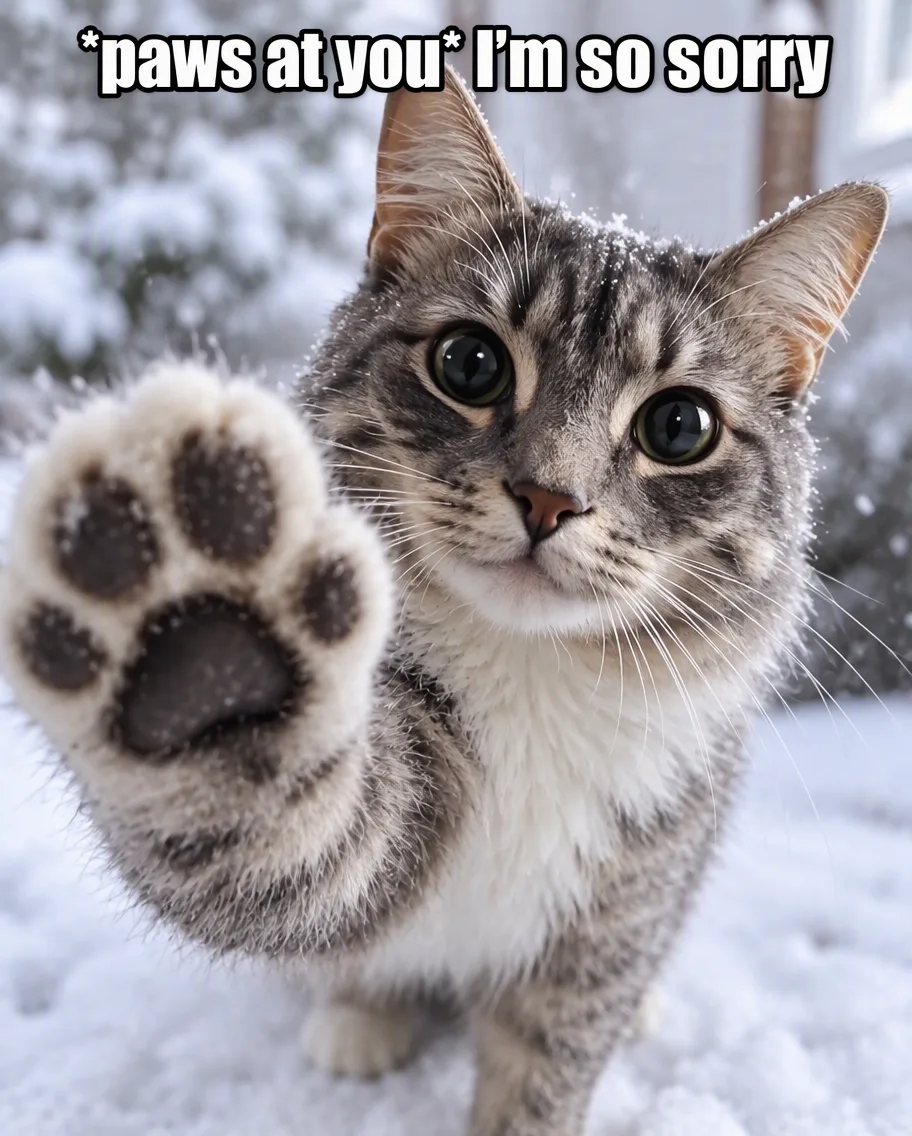
How to make the paws at you meme: start from a clear, front-facing photo of your pet or character, give it one paw reaching toward the camera and huge round dark eyes, then add a caption in the format "*paws at you* + one short line" (for example "*paws at you* hop online"). You can do it with a blank template and a meme app, or with a single AI edit of your own photo.
Want to try it on your own pet? The paws at you meme generator on PicOnTap needs no sign-in. Each edit costs 2 credits at 1K, and the daily free allowance is 2 credits (reset at 00:00 UTC).
How we put this together: the meme's history comes from Know Your Meme's entry and Yahoo's write-up, checked on November 1, 2026. The example images are real GPT Image 2.5 and Nano Banana 2.1 edits we ran in the PicOnTap editor on November 1, 2026, one run each, starting from AI-generated originals. Credit costs come from PicOnTap's pricing page, checked the same day.
Updated November 1, 2026: after a same-day PicOnTap update, we re-ran the two Nano Banana 2.1 edits that were not delivered on the first try and added both results.
TL;DR
- The paws at you meme is a snow leopard photo edited with the big round eyes of Mei Mei the cat, captioned "*paws at you*" plus a short line.
- The fastest version: a blank template plus your own caption.
- The more personal version: turn your own pet into the meme with one prompt. In our test, GPT Image 2.5 and Nano Banana 2.1 both made all three edits in about a minute each; GPT Image 2.5 drew the bigger, sharper paw.
- Keep the caption short. Gaming invites, apologies and "feed me" lines are the most common; 40 ideas are below.
What is the paws at you meme?
The paws at you meme (also called Snowmei, or simply the snow leopard meme) is a reaction image of a snow leopard reaching one paw toward the viewer, edited with the exaggerated eyes and face of Mei Mei, a viral cat also known as Tole Tole Cat. It is posted with the caption "*paws at you*" followed by a punchline, usually a gaming invite or a friendship joke (Know Your Meme).
The words come from older roleplay and furry chat, where actions are written between asterisks, like *nuzzles* or *pounces* (Yahoo). So "*paws at you*" reads as a small, needy tap on the shoulder.
Where the snow leopard photo comes from
- May 25, 2024: X user @black03_white03 posts a photo of Himmel, a young snow leopard at Ishikawa Zoo in Nomi, Japan, reaching toward the camera (original post).
- October 23, 2026: the earliest known version with Mei Mei's face is posted by X user @harvest_skies (Know Your Meme).
- October 27, 2026: a "*paws at you*" post by @PhoenixReal902 passes 1.4 million views in about a day, and a "True friendship" chat screenshot by @themeanaest gets more than 151,000 likes.
- October 28, 2026: the Epic Games Store's X account posts its own version, "paws at you hop online", which passes 950,000 views in about 14 hours.
Numbers are as reported by Know Your Meme and Yahoo on October 30–November 1, 2026.
Was the original paws at you edit made with AI?
Sources disagree. Know Your Meme says the photo was altered with AI image tools and then edited further. Yahoo says it was either AI or a simple Photoshop edit. A Reddit thread in r/TheMatpatEffect traces the face swap to a Photoshop edit by X user Rainingtm, made on top of a copy of the zoo photo that had been zoomed out with AI, which would explain why AI-detection checks flag it. That last account is community research, not a confirmed fact.
For your own version it matters less than it seems: what people react to is the pose, the eyes and the caption.
How to make the paws at you meme with your own pet
PicOnTap is a browser-based AI image editor: upload a photo and describe the change in a sentence to remove objects, replace backgrounds, recolor details or restore old photos. The steps below work in any editor that takes a photo and a written instruction.
What you need
- A photo of one pet or character, facing the camera, with the face in focus and well lit.
- A caption idea (see the list below).
- A few minutes. In our test each edit took 51 to 70 seconds.
Step 1: Pick a photo where the face is clear
Choose a photo taken at eye level, with the whole head visible. The edit has to keep your pet recognizable while changing its pose, so the model needs to see the face and markings.
Common mistake: a small pet in a wide room shot. Crop closer first.
Step 2: Choose the look
There are two ways to play it:
- Keep my pet: your pet keeps its own fur, markings and face, and only borrows the pose and the eyes.
- Snow leopard coat: your pet gets a pale gray coat with dark rosettes, closer to the original meme.
Step 3: Write the prompt
This is the prompt we used for the "keep my pet" look:
Turn this into the snow leopard "paws at you" meme: a close-up where the animal reaches one front paw toward the camera, paw pads large and sharp in the foreground, with huge, round, glossy black eyes looking straight at the viewer. Keep its fur colors, markings and face. Soft, cool winter light.
For the coat version, replace "Keep its fur colors, markings and face" with "Give it a thick, pale gray snow leopard coat with dark rosettes, and keep its face recognizable", and add "Snowy background".
Each part does a job. "Paw pads large and sharp in the foreground" gives the reaching pose. "Huge, round, glossy black eyes" gives the Mei Mei look. "Keep its fur colors, markings and face" stops the model from replacing your pet with a generic cat.
Step 4: Add the caption
Add one more sentence to the prompt, for example: Add the caption "*paws at you* I'm so sorry" at the top in bold white meme text with a black outline.
Keep the line under about six words so it stays readable on a phone. If you would rather set the text yourself, skip this sentence and add the caption in any meme app afterwards.
Step 5: Check the result
Before you post it, check four things: your pet is still recognizable, one paw reaches toward the camera, the eyes are enlarged, and the caption is spelled exactly as you wrote it. If the eyes are not big enough, run a second edit with "make the eyes even bigger and rounder".
Our test: three photos, two models
On November 1, 2026 we ran the same prompts in the PicOnTap editor on three AI-generated originals (a tabby cat, a corgi and an illustrated fox character) with GPT Image 2.5 and Nano Banana 2.1, at 1K and the original aspect ratio, one run each. The two Nano Banana 2.1 edits that were not delivered on the first try were re-run after a same-day PicOnTap update.
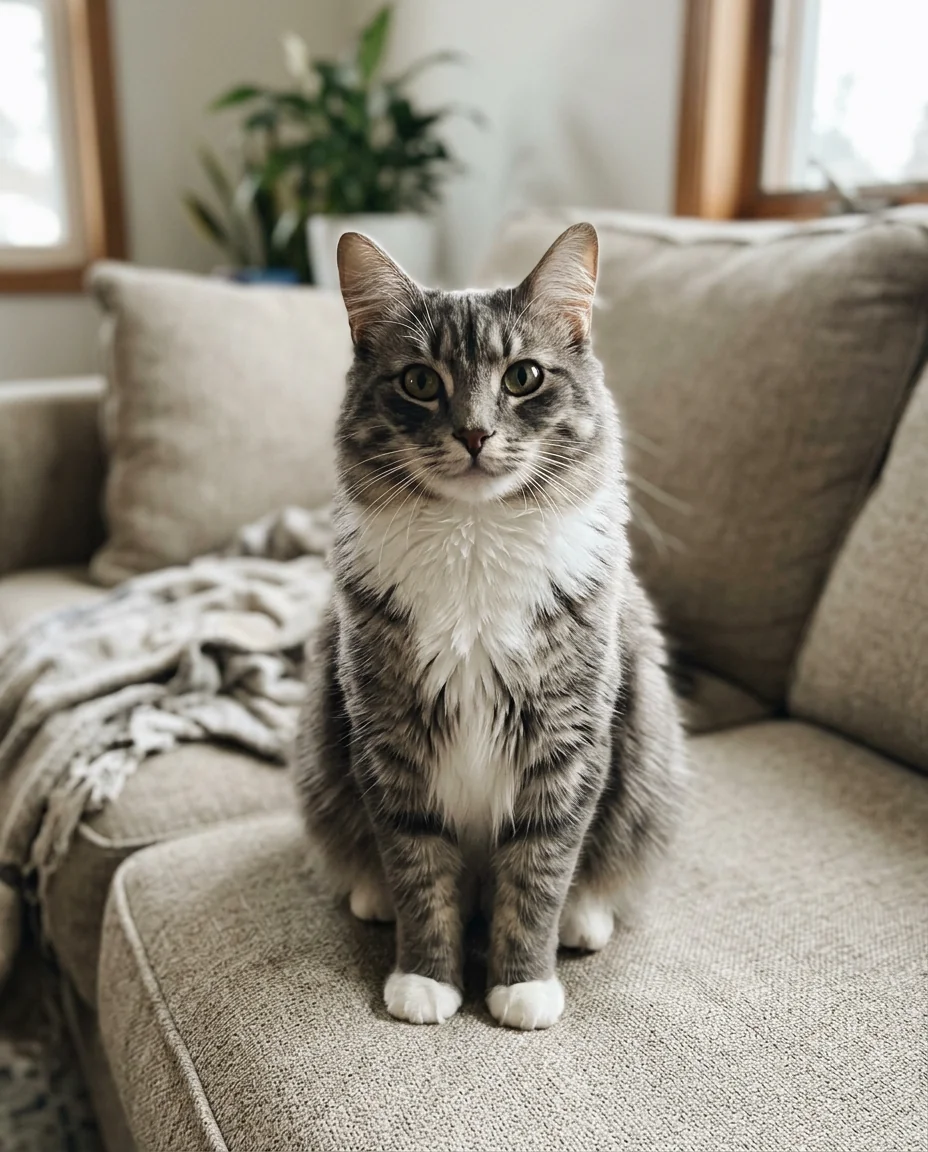 Original: AI-generated tabby cat photo used in the test.
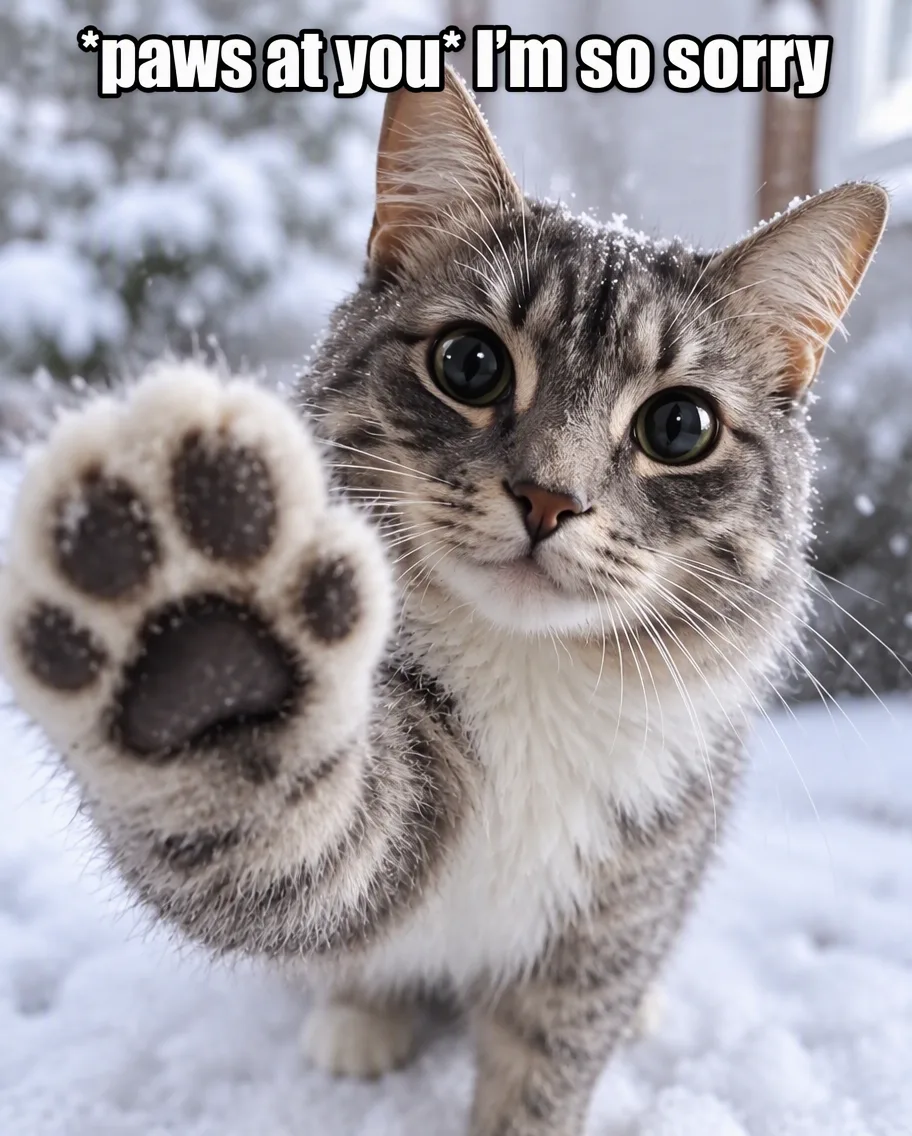 Result: a real GPT Image 2.5 edit in PicOnTap, November 1, 2026, with the keep-my-pet prompt.
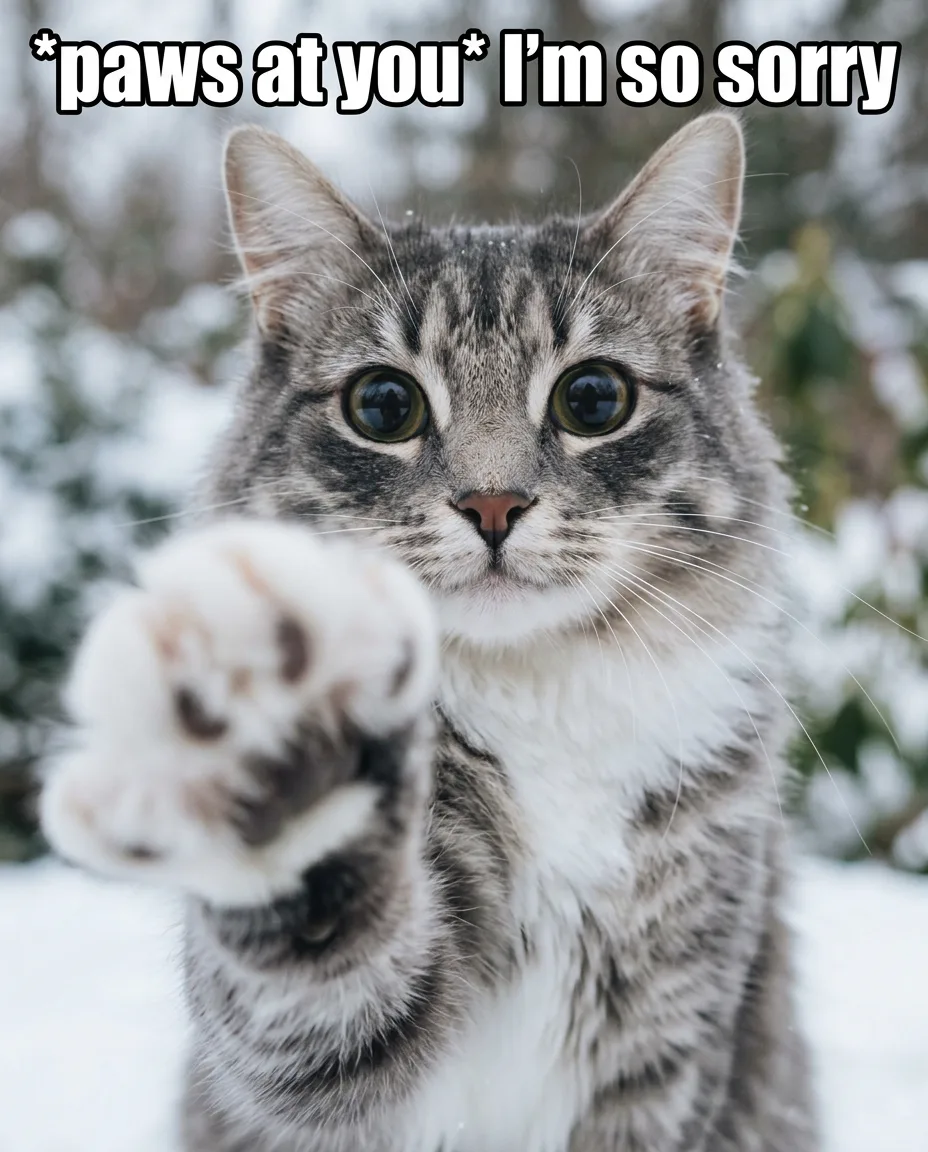 Result: a real Nano Banana 2.1 edit in PicOnTap, November 1, 2026, with the same prompt.
- Tabby cat, keep my pet: both models kept the stripes and white chest and spelled the caption exactly. GPT Image 2.5 put a large, sharp paw in the foreground; Nano Banana 2.1 drew a smaller paw that is out of focus, so the paw-in-your-face effect is weaker. In both, the eyes are bigger and rounder but less extreme than Mei Mei's.
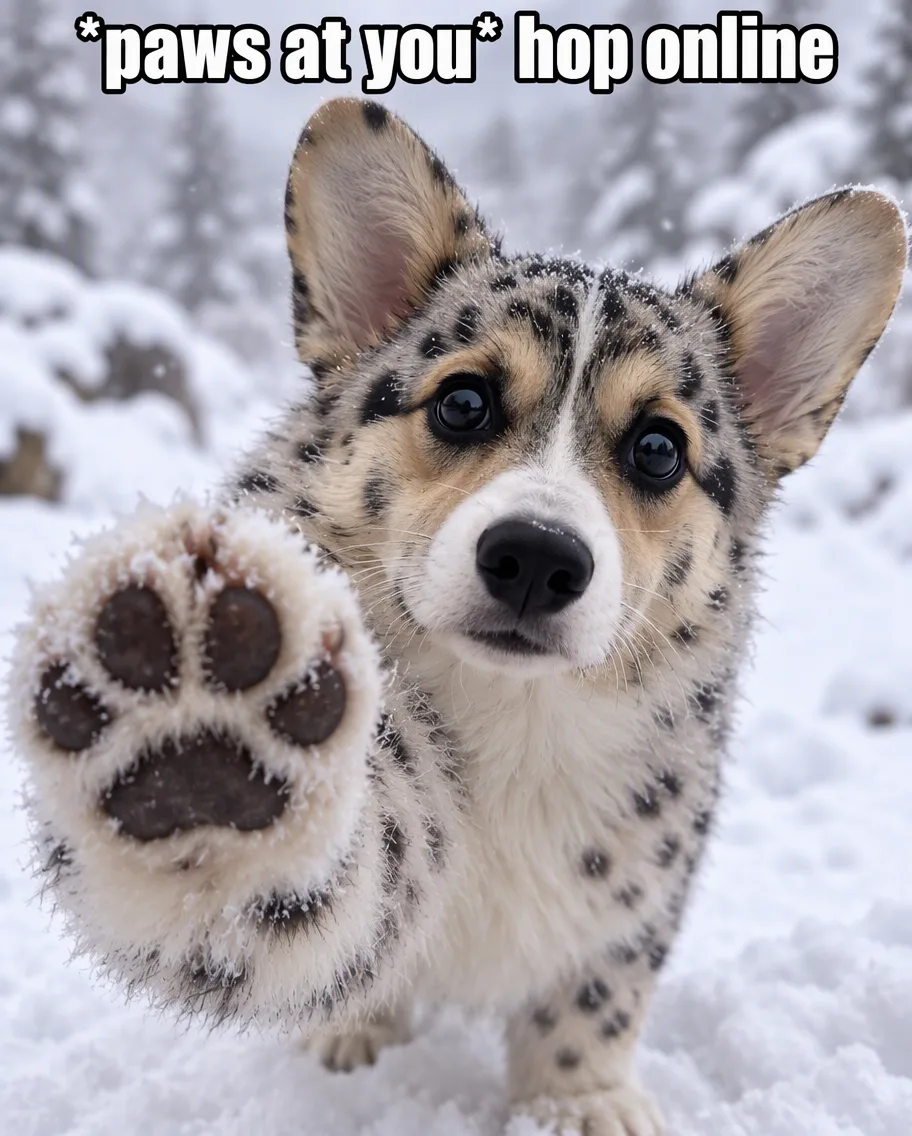 Result: a real GPT Image 2.5 edit in PicOnTap, November 1, 2026, with the snow leopard coat prompt. Original: AI-generated.
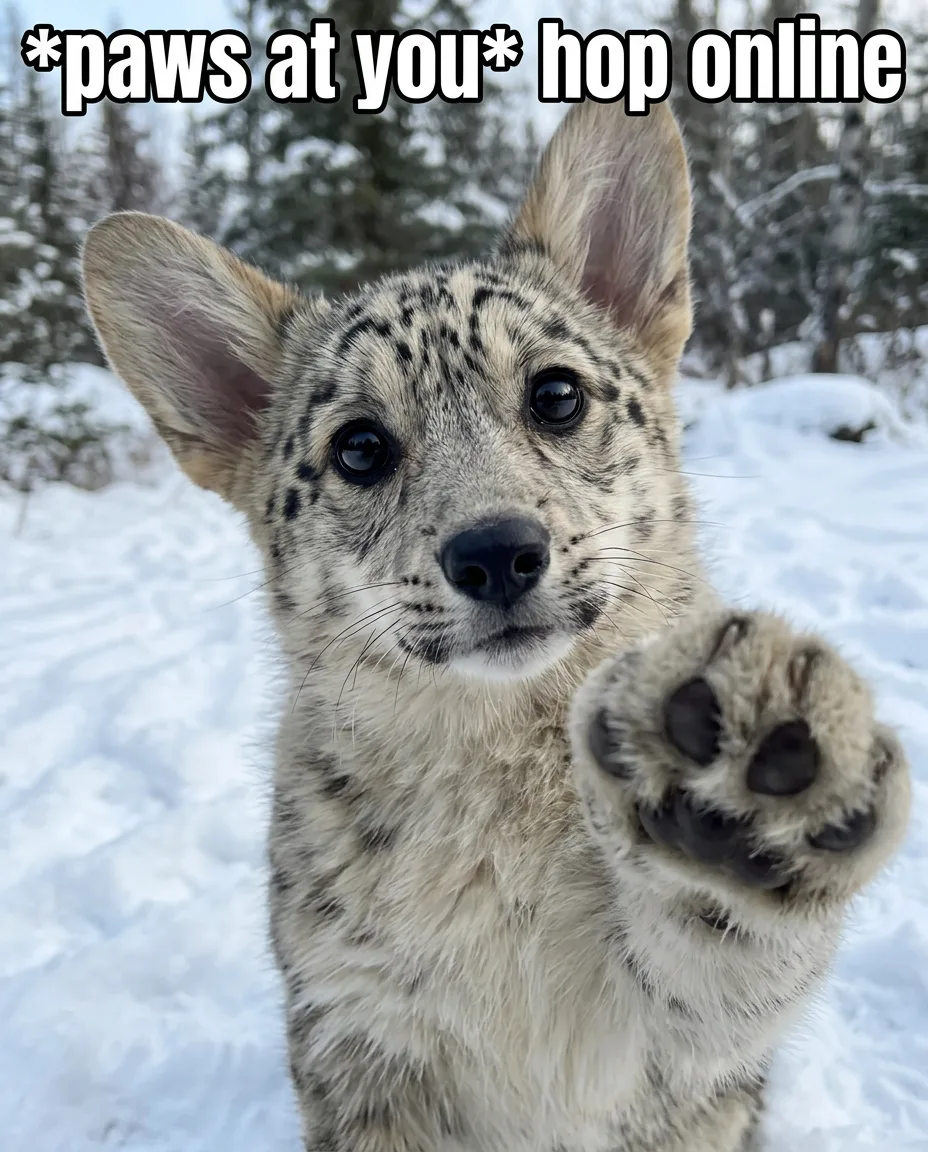 Result: a real Nano Banana 2.1 edit in PicOnTap, November 1, 2026, with the same prompt. Original: AI-generated.
- Corgi, snow leopard coat: both models added the coat and an exact caption. GPT Image 2.5 kept the corgi's tricolor face and put the paw front and center. Nano Banana 2.1 pushed the face further toward a real snow leopard and raised the paw at the side, so it reads more like the original meme and less like your dog.
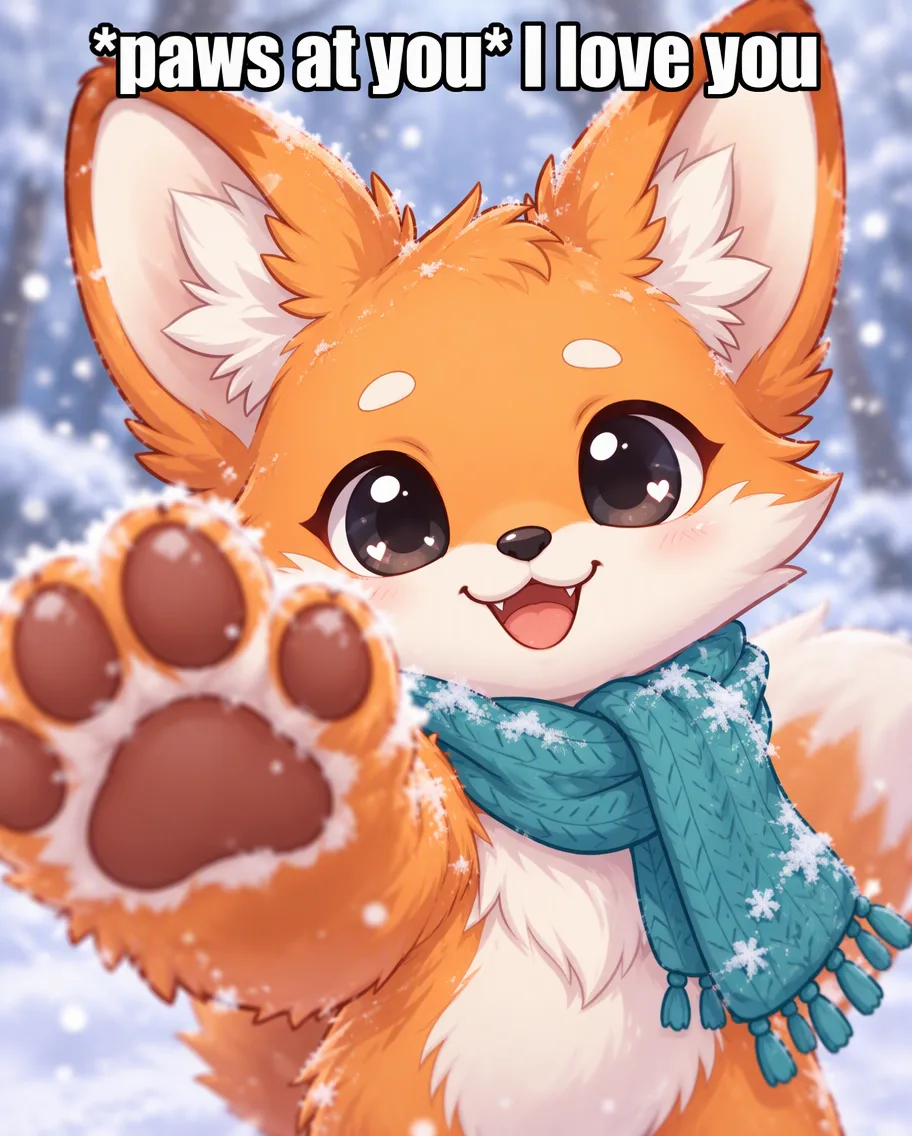 Result: a real GPT Image 2.5 edit in PicOnTap, November 1, 2026. Original: an AI-generated character.
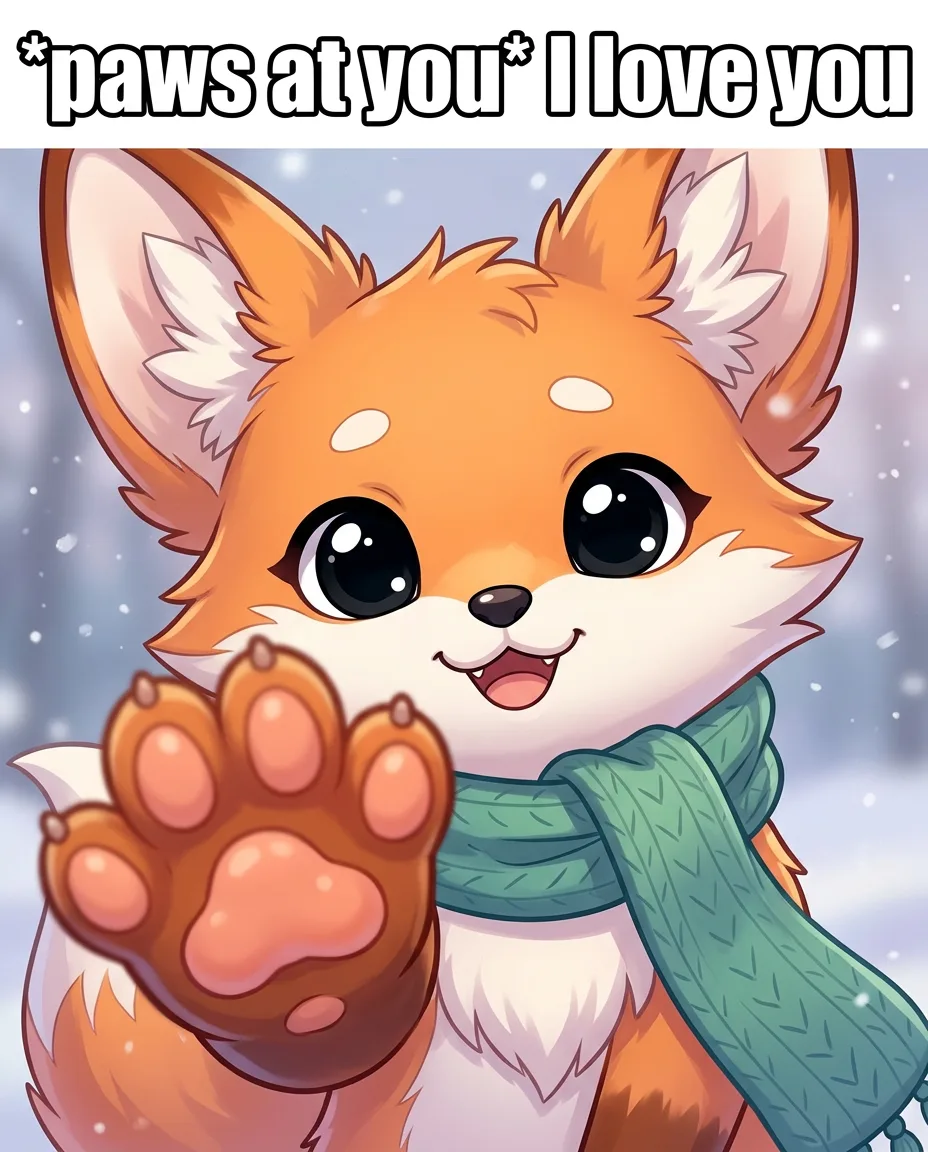 Result: a real Nano Banana 2.1 edit in PicOnTap, November 1, 2026. Original: an AI-generated character.
- Illustrated fox, keep my pet: both models kept the drawing style and the scarf, and added the paw, the snow and the caption. GPT Image 2.5 made the paw bigger and closer; Nano Banana 2.1 kept it smaller and put the caption on a white band above the picture instead of over it. Drawings and original characters work without extra instructions.
Summary: both models delivered all three edits, in 51 to 70 seconds each, at 2 credits per edit. GPT Image 2.5 is the better pick for this meme: it drew the bigger, sharper paw every time and kept the corgi's own face. Nano Banana 2.1 kept the cat and the fox recognizable but drew smaller or softer paws, and pushed the corgi toward a real snow leopard. This is a small test with one run per edit, and results vary between runs.
Free paws at you meme templates
If you only want to add a caption, start from a template. Avoid reposting the zoo photo itself: it is a visitor's photo, and an original template sidesteps the question of who owns it.
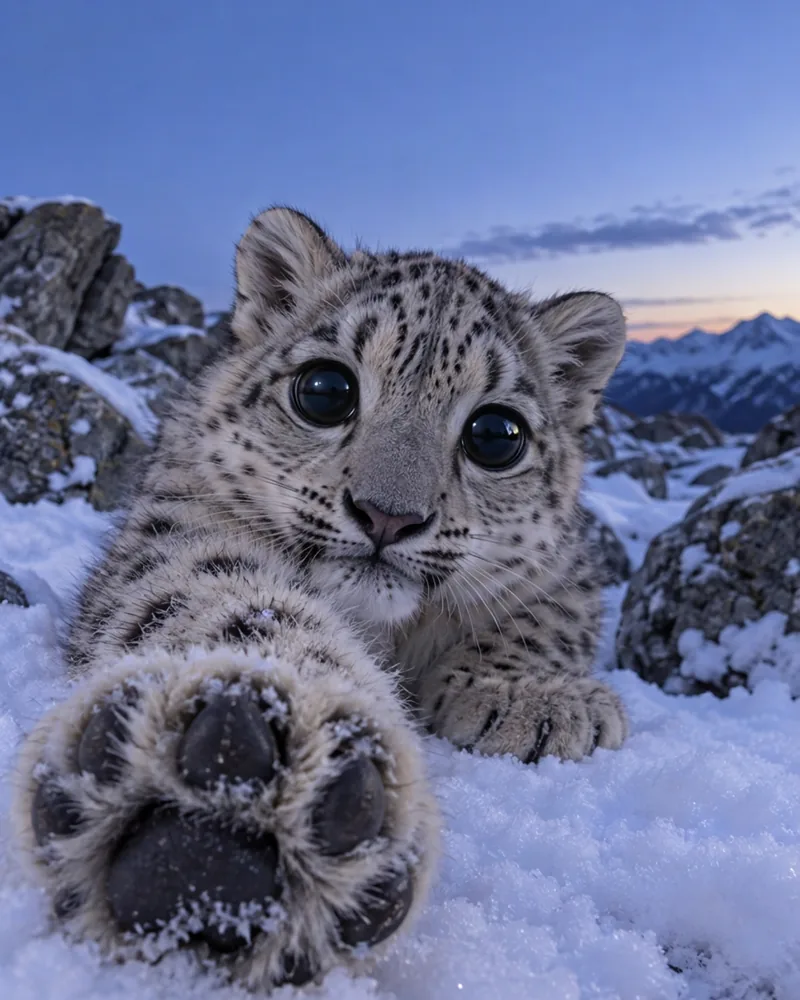 An original paws at you template made for PicOnTap. It is not the zoo photo and does not use Mei Mei's face.
PicOnTap made four original templates for this meme, free to use for memes and posts:
- Blank, 4:5 (Instagram and TikTok photo posts)
- Blank, 1:1 (X and chat replies)
- With caption space, 4:5
- With caption space, 1:1
Template or your own pet: which should you use?
- Use a template when you want to reply in a chat right now, or you are making a series with many captions. It takes a minute in any meme app.
- Use your own pet when the joke is about you or your pet, for a profile picture, or to stand out from the hundreds of identical template posts. In our test, the "keep my pet" look with GPT Image 2.5 gave the most recognizable results.
To turn your own photo into the meme, open the paws at you meme generator: it has both looks and the caption lines below as one-tap buttons.
Paws at you meme caption ideas
Every caption follows the same pattern: "*paws at you*" and then one short line. The first three come from posts about the meme; the rest are ideas grouped by mood.
Seen in real posts
- *paws at you* hop online (Epic Games Store)
- *paws at you* hi (an r/NonPoliticalTwitter post)
- *paws at you* true friendship (@themeanaest)
Gaming invites
- *paws at you* get on
- *paws at you* we playing or what
- *paws at you* one more game?
- *paws at you* queue up
- *paws at you* are you on yet
- *paws at you* the lobby is waiting
- *paws at you* carry me
Apologies
- *paws at you* I'm so sorry
- *paws at you* forgive me
- *paws at you* I didn't mean it
- *paws at you* please don't be mad
- *paws at you* I ate your fries
Love and friendship
- *paws at you* I love you
- *paws at you* you're my best friend
- *paws at you* I miss you
- *paws at you* thank you
- *paws at you* you're doing great
Attention, please
- *paws at you* notice me
- *paws at you* am I annoying
- *paws at you* text me back
- *paws at you* pick up the phone
- *paws at you* pay attention to me
Food
- *paws at you* feed me
- *paws at you* snack?
- *paws at you* is it dinner yet
- *paws at you* share your food
- *paws at you* one more treat
Mornings and late nights
- *paws at you* wake up
- *paws at you* good morning
- *paws at you* go to sleep
- *paws at you* it's 3 am, you up?
- *paws at you* five more minutes
Fandoms and plans
- *paws at you* did you watch the new episode
- *paws at you* no spoilers
- *paws at you* stream tonight?
- *paws at you* happy birthday
- *paws at you* are we still going out
FAQ
What does "paws at you" mean?
It is a roleplay-style action written between asterisks, like *nuzzles*: the speaker playfully taps at you to get your attention. In the meme it comes before a short request, apology or greeting.
Who is the cat in the paws at you meme?
The body is Himmel, a snow leopard at Ishikawa Zoo in Japan. The eyes and face come from Mei Mei, also known as Tole Tole Cat, a cat that went viral in 2023 (Know Your Meme).
Can I use the original snow leopard photo?
The photo was taken and posted by a zoo visitor on X, so it is theirs. For your own posts, an original template or an edit of your own pet avoids the question altogether.
Does it work with dogs, drawings and original characters?
Yes. In our test, a corgi and an illustrated fox both worked with the same prompt. For drawings, both models kept the illustration style without extra instructions.
How much does it cost on PicOnTap?
There is no sign-in needed. Each edit costs 2 credits at 1K, the daily free allowance is 2 credits and resets at 00:00 UTC, and paid plans start at 200 credits a month (pricing, checked November 1, 2026).
Make yours
The paws at you meme is easy to copy and better when it is personal: a recognizable pet, one paw in your face, big eyes and a five-word line. Pick a caption above, then make it with your own photo in the paws at you meme generator.